Telegram Integration for WHMCS

$99.00 USD

The Telegram Integration For WHMCS lets linked customers view services and invoices, request renewals, receive alerts, and browse your product catalog from Telegram.

Included:

  • 7-Day Free Trial Access
  • Multi-Level Technical Support
  • One-Time Payment, No Recurring Fees
  • Lifetime Owned License
  • Instant Download After Purchase
  • Latest WHMCS Compatible

Description

Product Description

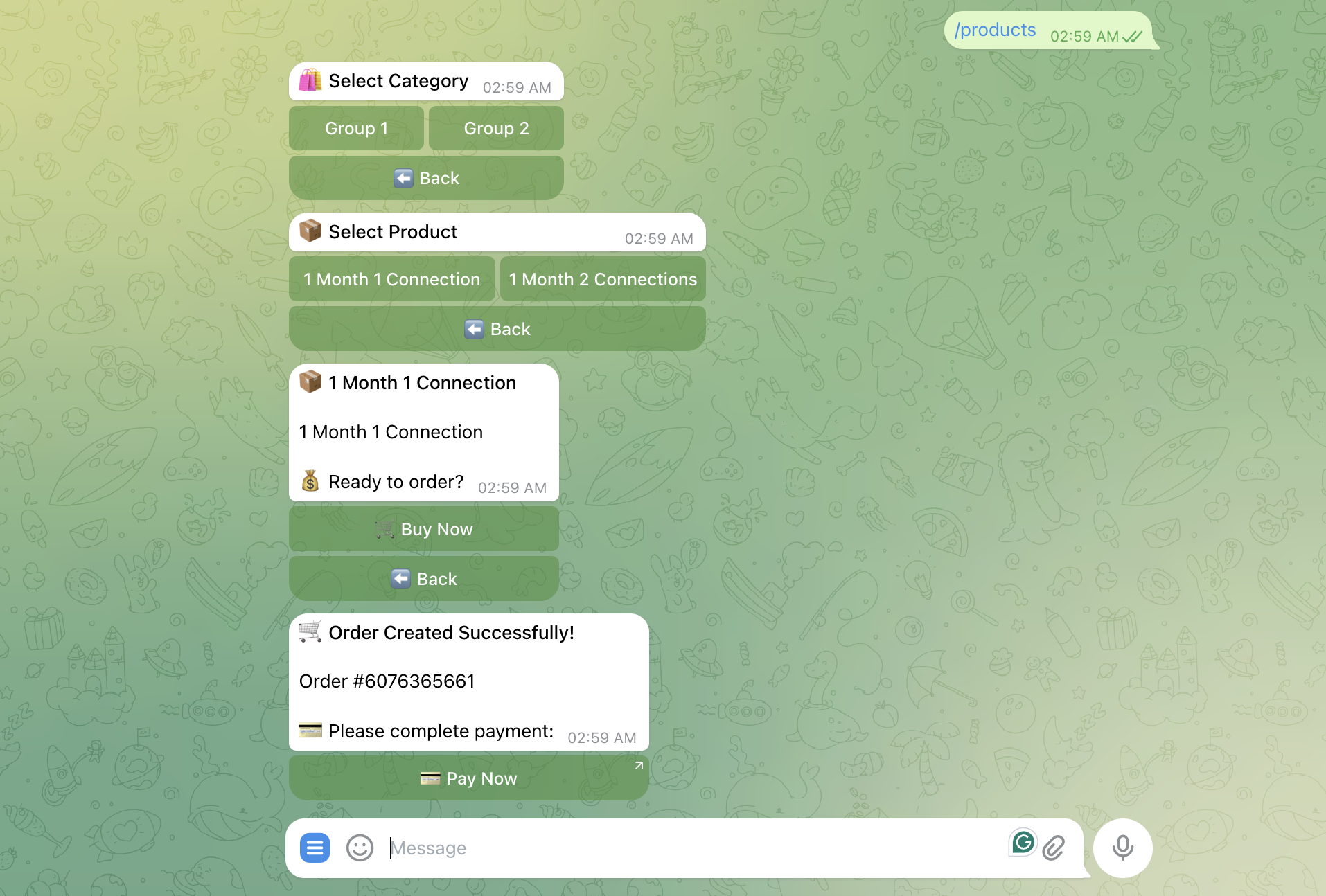
The Telegram Integration For WHMCS creates a convenient Telegram-based access point for your WHMCS customers. After linking their Telegram and WHMCS accounts, clients can browse your configured catalog, review services, check invoices, request recurring-service renewals, view account information, and receive automated updates.

The bot presents frequently used actions through an interactive button menu, making account information easier to reach from a mobile device. Where a complete WHMCS page is required, such as invoice payment or detailed service management, the bot supplies a direct link that opens the relevant client-area page.

Administrators also receive tools for managing the Telegram catalog, viewing linked users, sending promotional messages, controlling the bot webhook, and reviewing logged bot activity from the WHMCS addon area.

How It Works

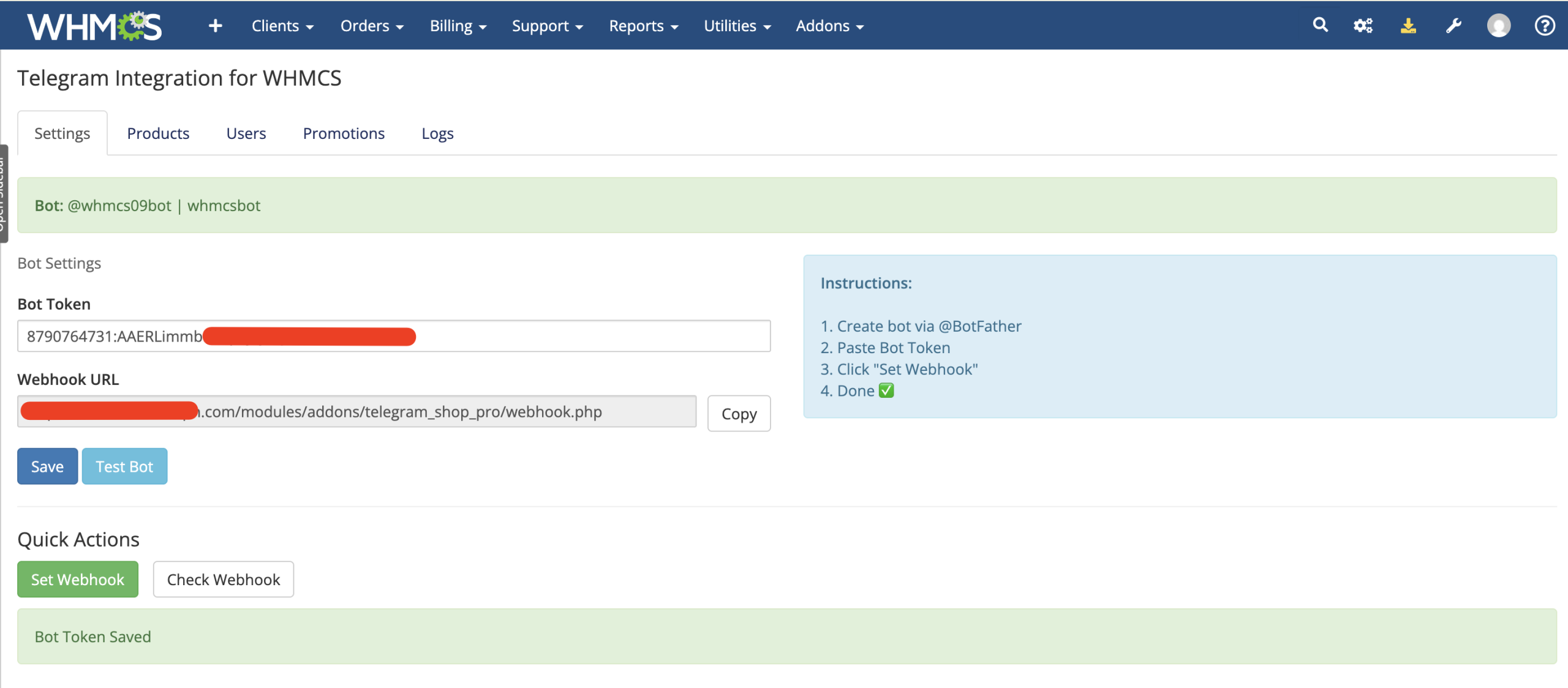
  1. Connect the Bot: Enter a Telegram bot token, test the connection, and register the supplied webhook URL.
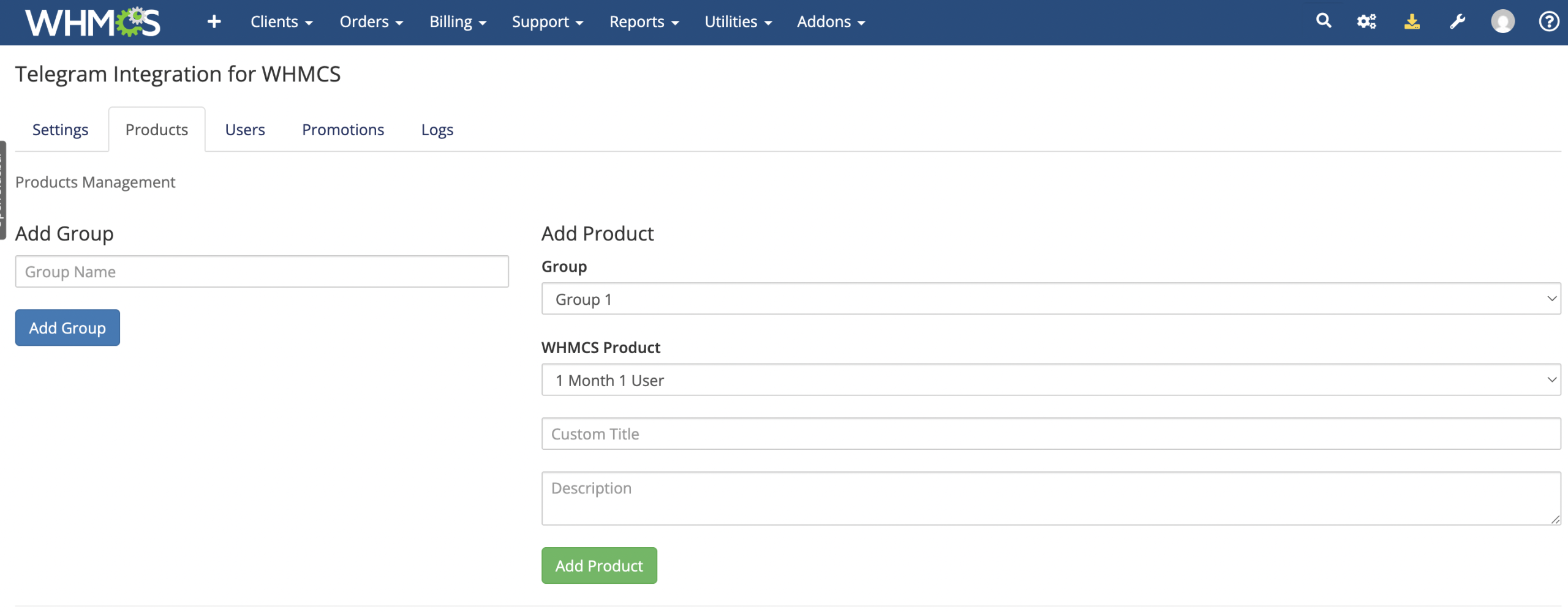
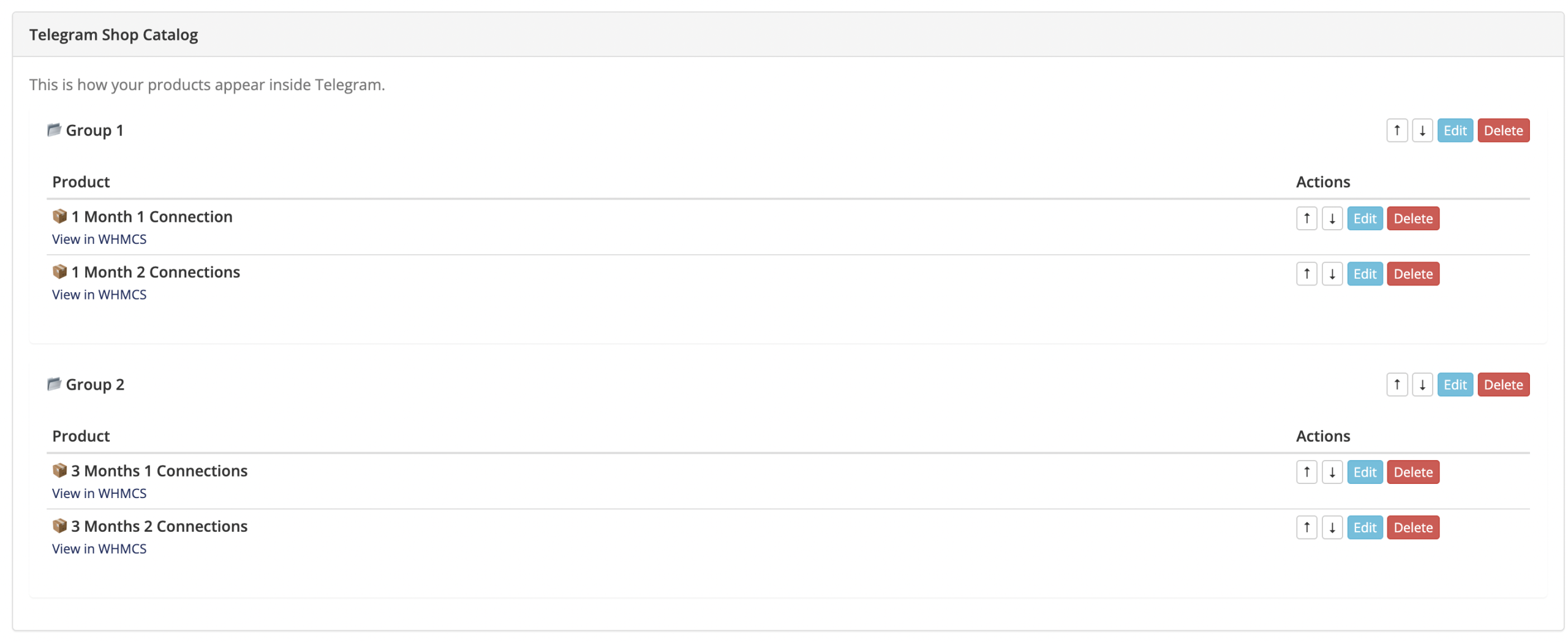
  2. Build the Catalog: Create Telegram product groups and map catalog entries to WHMCS products.
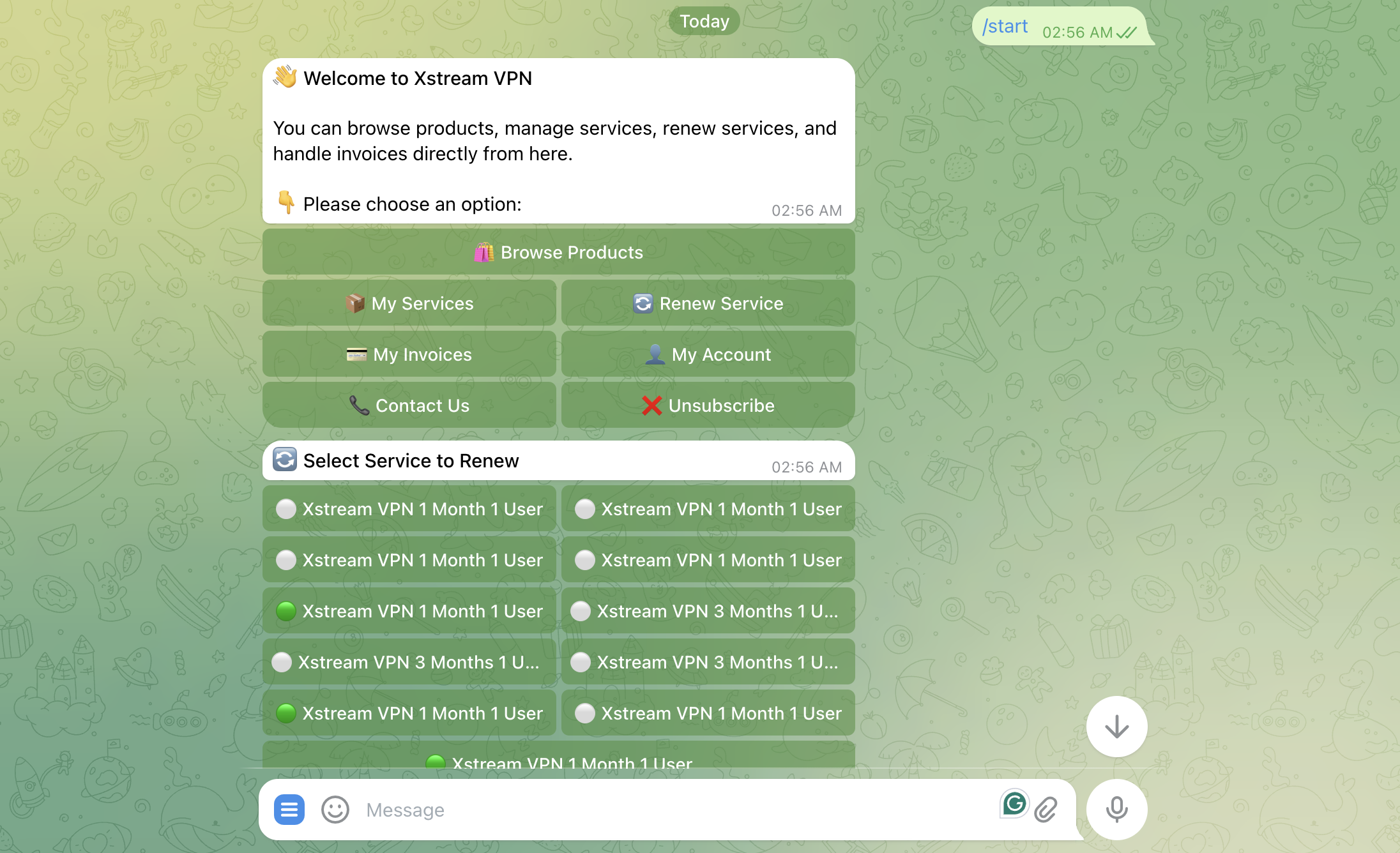
  3. Customer Starts the Bot: Telegram displays the available account and shopping actions.
  4. Link the Account: The customer follows a temporary link and signs in to WHMCS to connect the accounts.
  5. Use Telegram Tools: The linked customer can explore services, invoices, renewals, products, and account information.
  6. Receive Updates: Enabled order, invoice, activation, and suspension events are delivered to the customer’s Telegram chat.

Key Features

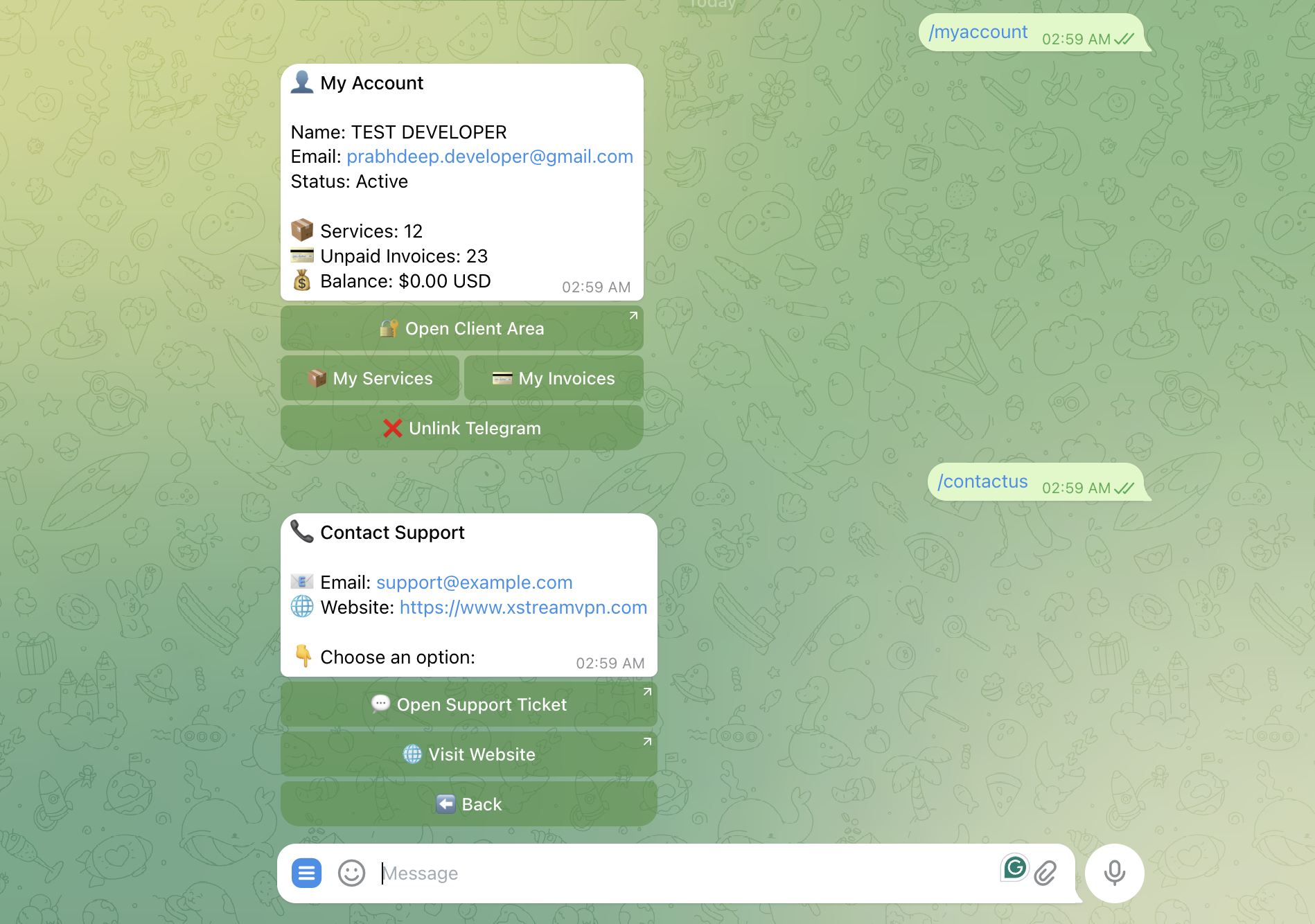
  • Telegram Client Menu: Present products, services, renewals, invoices, account details, and contact options through interactive buttons.
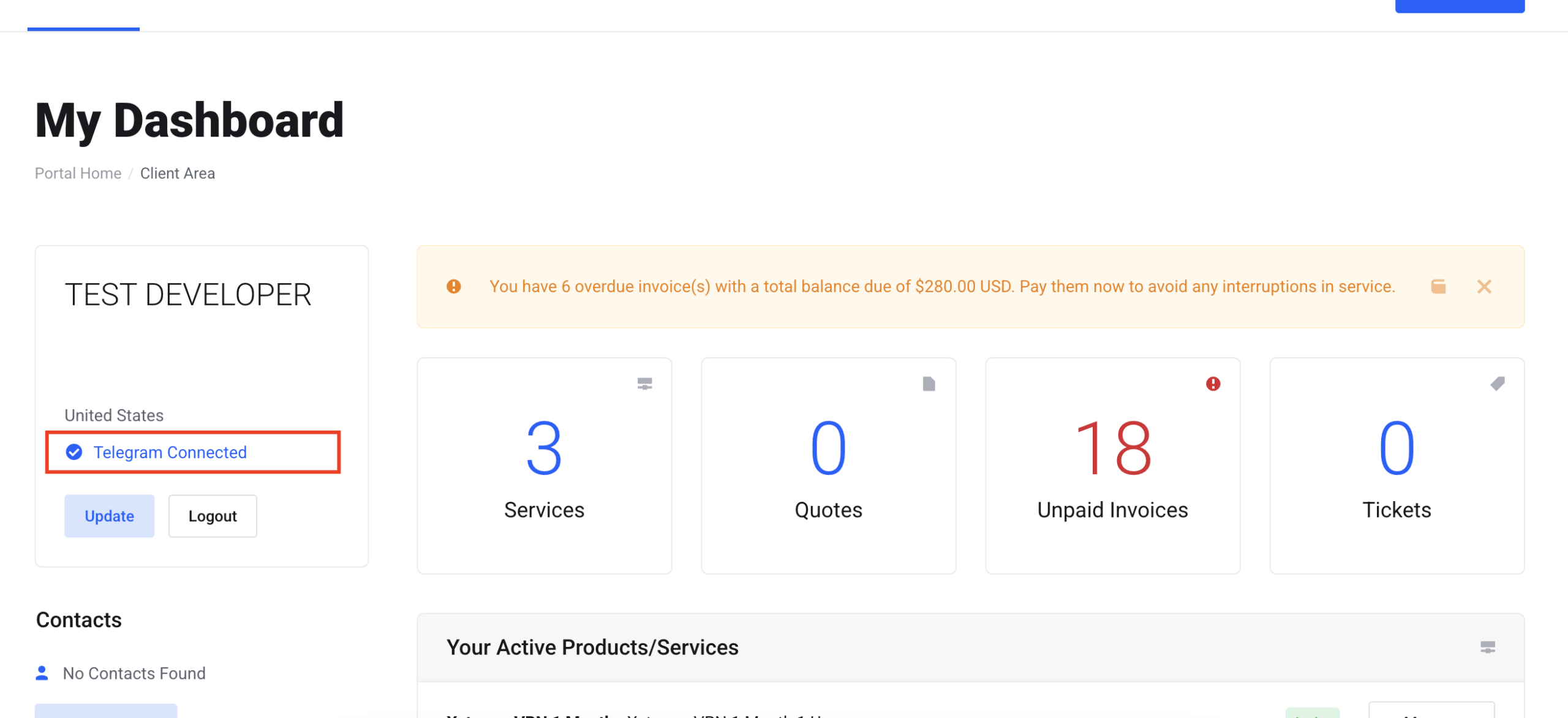
  • WHMCS Account Linking: Connect one Telegram account with a WHMCS client after the customer authenticates in the client area.
  • Product Catalog: Create custom groups, titles, descriptions, ordering, and WHMCS product mappings for Telegram.
  • Service Overview: List client services and identify active, suspended, terminated, and other statuses.
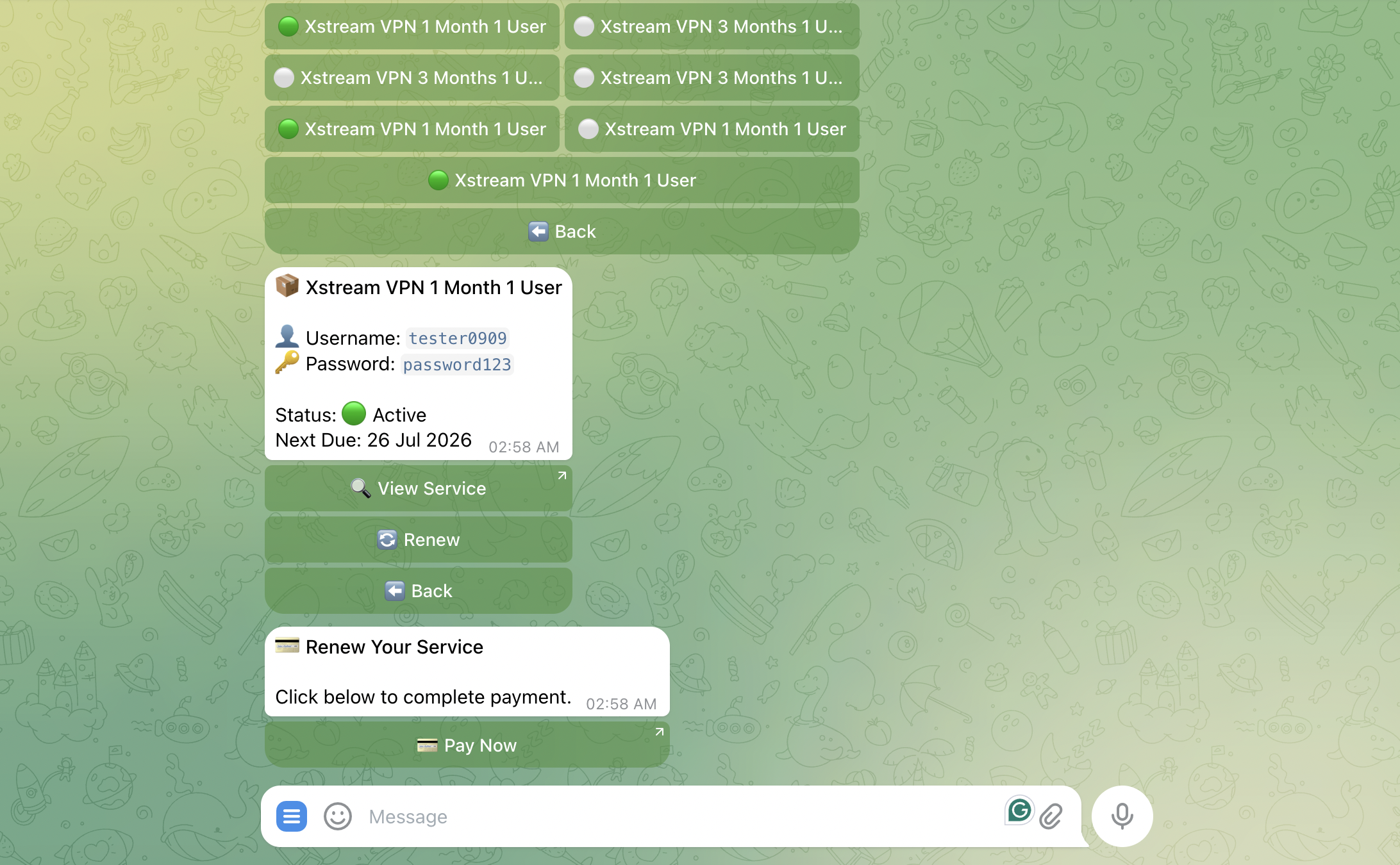
  • Service Details: Display the product, domain, status, next due date, and available stored service credentials.
  • Invoice Management: Show unpaid, overdue, and recent paid invoices with links to the related WHMCS invoice page.
  • Recurring-Service Renewal: Generate a renewal invoice for supported recurring billing cycles and provide a payment link.
  • Customer Notifications: Send selected invoice, order, activation, and suspension updates automatically.
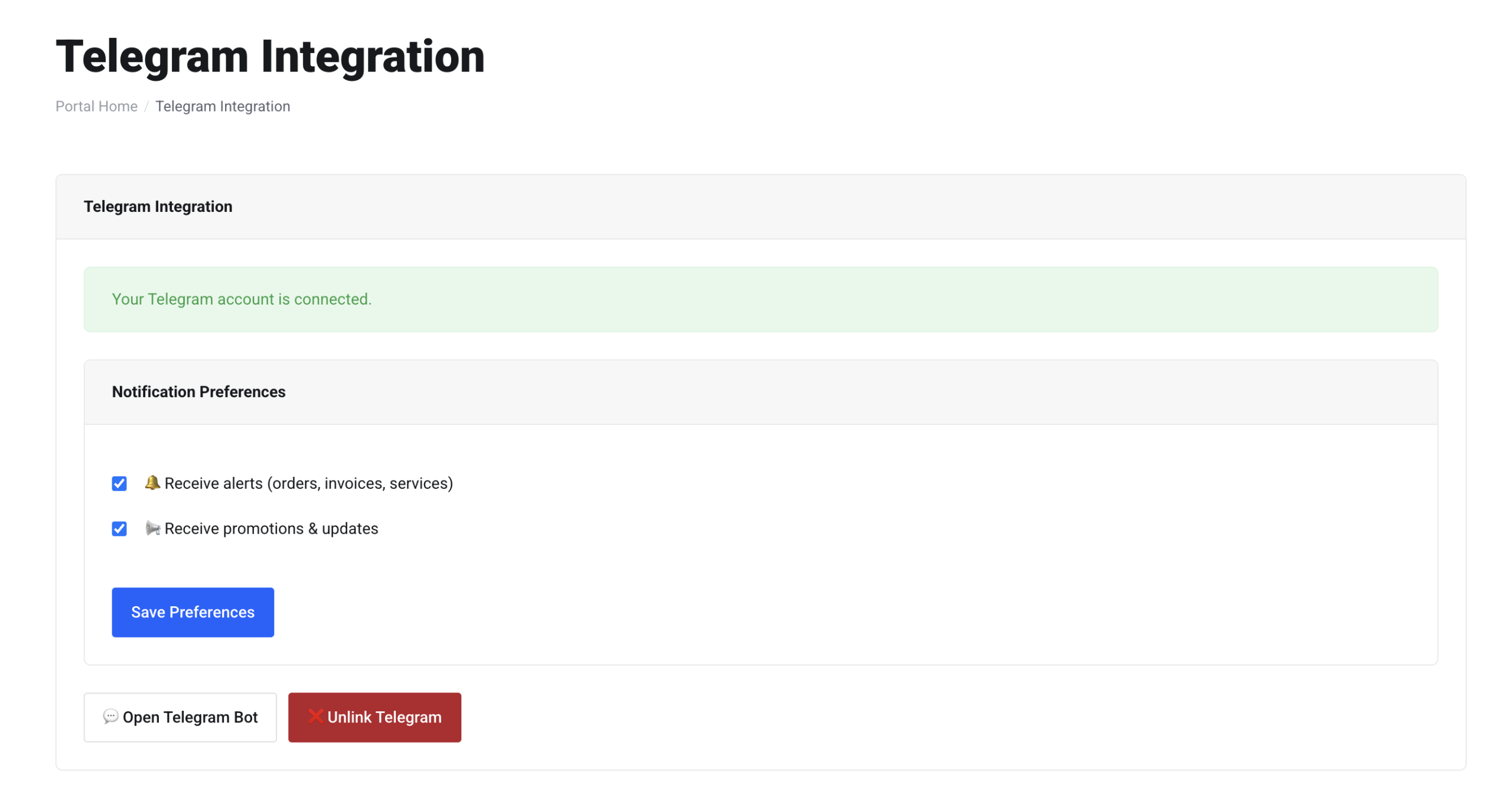
  • Notification Preferences: Let clients independently control account alerts and promotional messages.
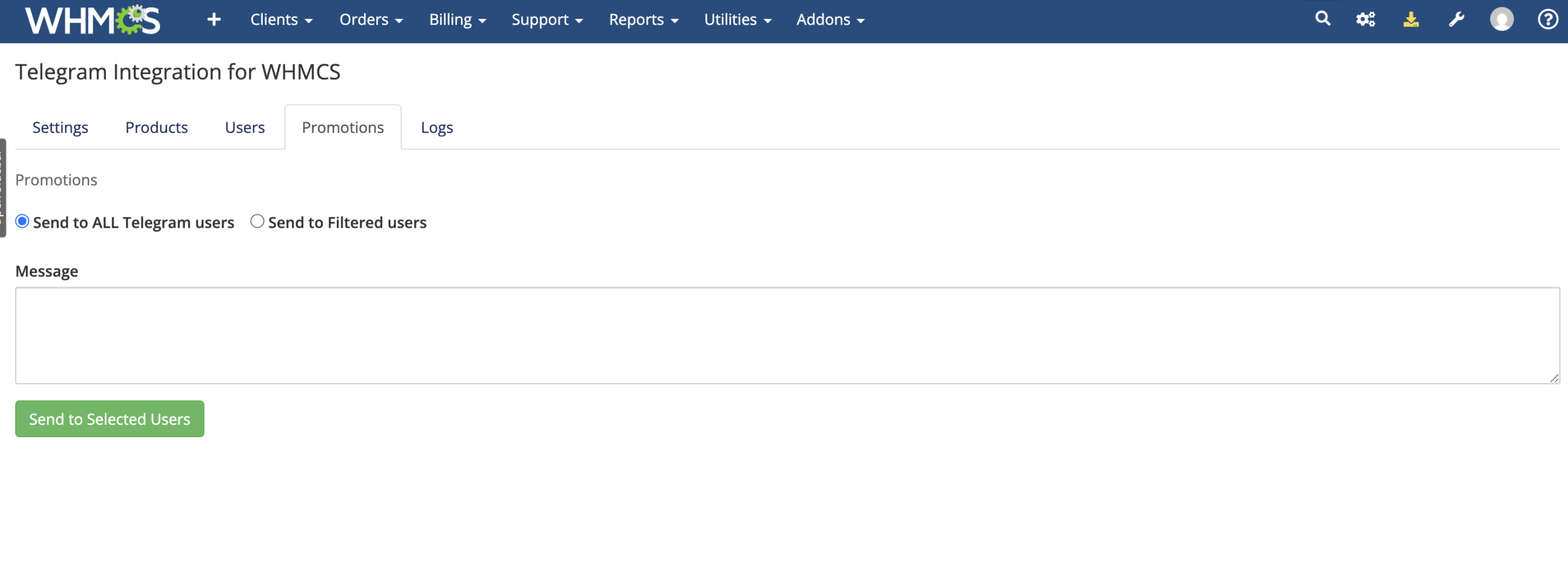
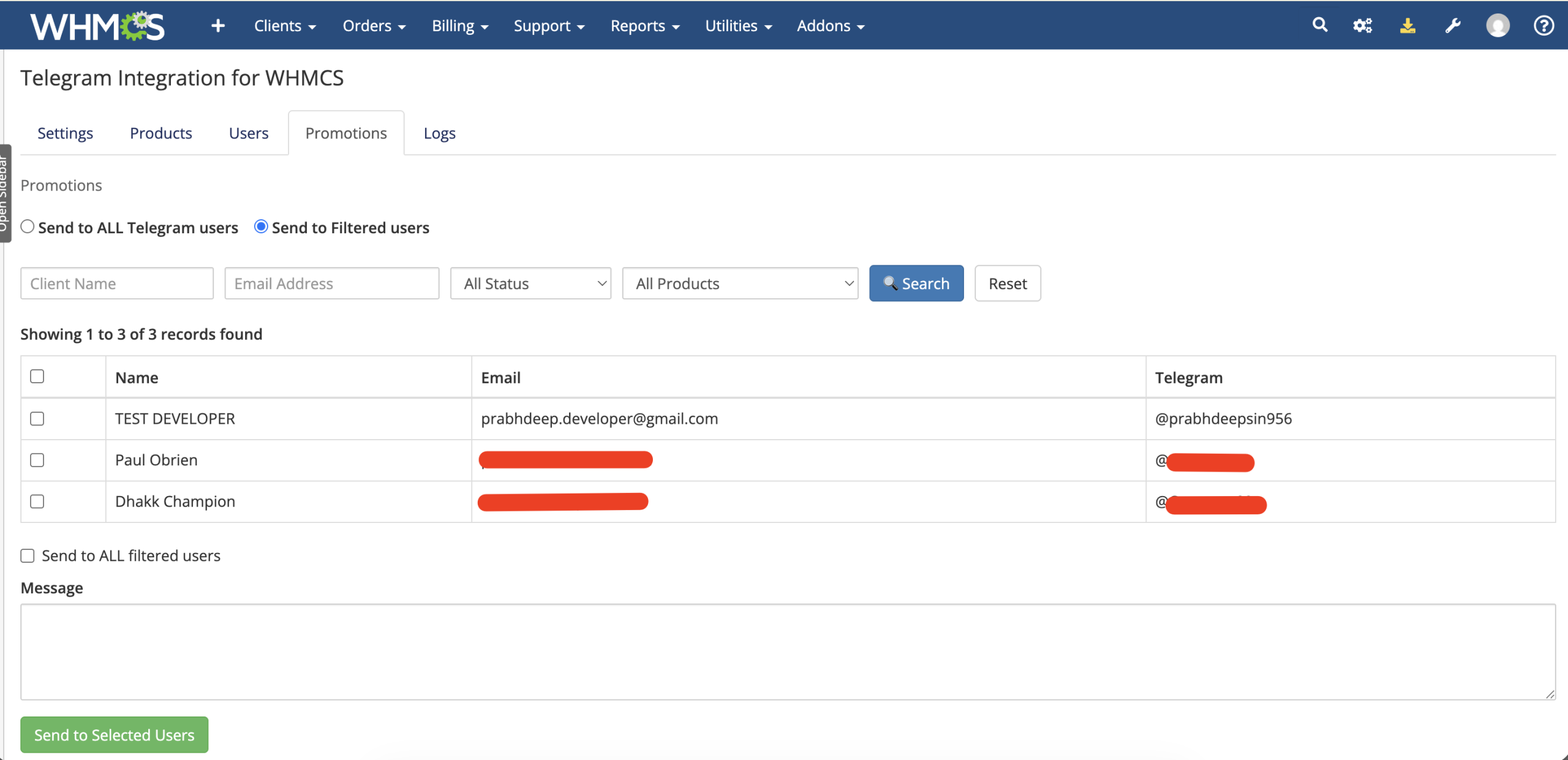
  • Targeted Promotions: Send marketing messages to all opted-in users or filter recipients by client details and products.
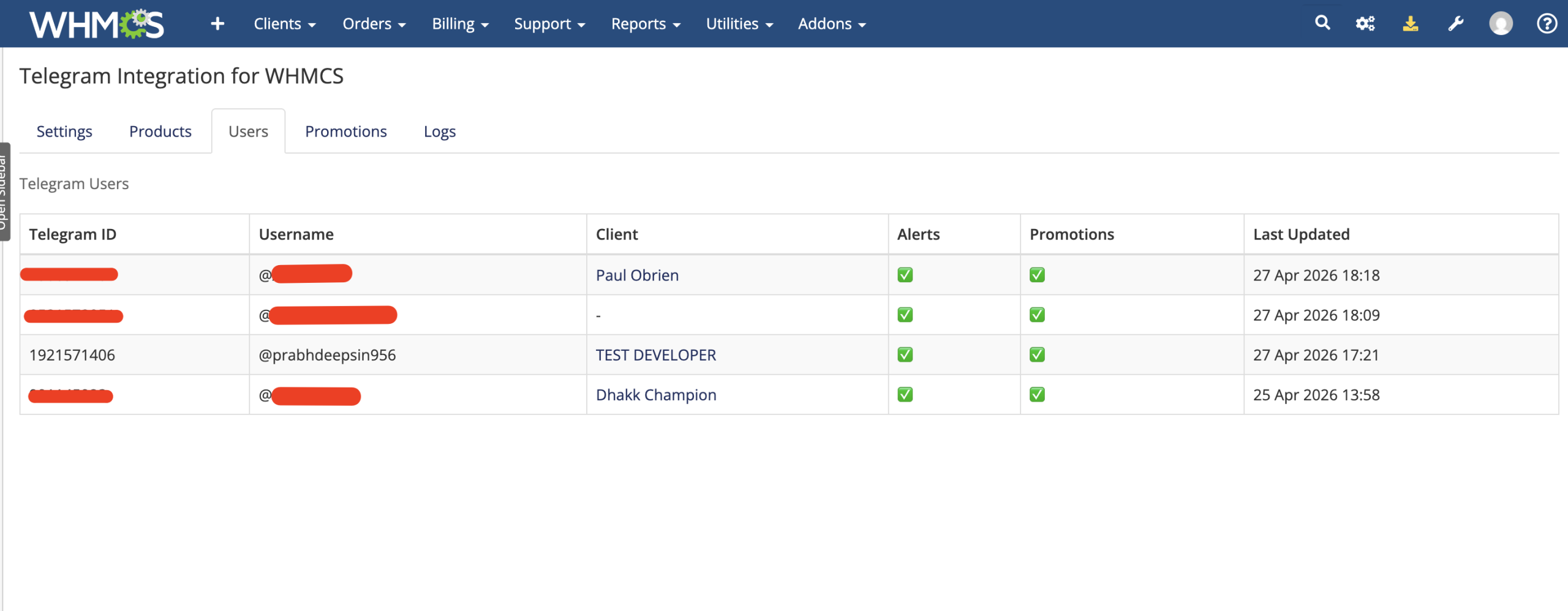
  • Admin Users and Logs: Review linked Telegram users, preferences, bot actions, and delivery results with pagination.

Telegram Product Catalog

  • Create custom product categories for display inside Telegram.
  • Map Telegram catalog entries to products already configured in WHMCS.
  • Set a customer-facing title and description for each catalog item.
  • Move product groups and items to control their display order.
  • Allow customers to browse groups and open product details through inline buttons.

Service Management

Linked clients can review the WHMCS services associated with their account directly from the bot.

  • View all services attached to the linked WHMCS client.
  • Identify service status using clear visual indicators.
  • See the product name, assigned domain, and next due date.
  • Display the stored service username and decrypted password when available.
  • Open the corresponding service-details page in the WHMCS client area.
  • Start the renewal workflow from the selected service.

Invoices and Renewals

  • Pending Invoices: List unpaid and overdue invoices with amounts in the client’s currency.
  • Paid History: Display up to 20 recent paid invoices.
  • Invoice Links: Open the associated WHMCS invoice page to review details or complete payment.
  • Renewal Selection: Let customers choose a service from their account for renewal.
  • Renewal Invoice Creation: Generate an invoice for recurring monthly, quarterly, semi-annual, annual, biennial, or triennial services.
  • Payment Continuation: Provide a direct route from Telegram to the generated WHMCS invoice.

Automated Customer Alerts

Customers with account alerts enabled can receive Telegram updates for supported WHMCS lifecycle events.

  • New invoice creation with invoice number, amount, and payment button
  • Successful invoice payment confirmation
  • Order acceptance notification
  • Service activation with a service-details link
  • Service suspension notification

Account Linking and Preferences

  • Generate a temporary account-linking URL that expires after ten minutes.
  • Require the customer to be logged in to WHMCS before linking.
  • Maintain one Telegram connection for each linked WHMCS client.
  • Replace an older Telegram connection when the client links a new account.
  • Allow customers to unlink from either Telegram or the WHMCS client area.
  • Let customers enable or disable account alerts and promotions separately.

Promotions and Marketing

  • Send a promotional message to all Telegram users who have opted in.
  • Search linked customers by first name, last name, or email address.
  • Filter recipients by active, inactive, or closed client status.
  • Target clients who own a selected WHMCS product or service.
  • Send to individually selected users or every user matching the filters.
  • Log successful and failed promotional deliveries for review.

Administrator Tools

  • Save and test the Telegram bot token.
  • Register and inspect the Telegram webhook.
  • Install supported bot commands automatically.
  • Manage Telegram product groups and catalog entries.
  • View linked Telegram IDs, usernames, WHMCS clients, and preferences.
  • Browse paginated bot and notification activity logs.
  • Review promotion delivery success and failure information.

Business Benefits

  • Improve Customer Convenience: Put common WHMCS account information inside a familiar messaging app.
  • Increase Notification Visibility: Deliver billing and service updates through Telegram as well as existing channels.
  • Support Faster Payments: Give clients direct access to pending invoices and payment pages.
  • Encourage Renewals: Make supported recurring-service renewal invoices easier to request.
  • Create a Direct Marketing Channel: Reach opted-in customers with targeted promotional messages.
  • Reduce Routine Navigation: Let customers find services, invoices, and account summaries through a guided bot menu.

Ideal For

  • Web hosting and reseller hosting providers
  • IPTV and digital subscription businesses
  • SaaS platforms using WHMCS
  • Service providers with Telegram-focused customers
  • Businesses seeking an additional customer notification channel
  • Teams that want targeted promotions for linked clients

Why Choose Telegram Integration For WHMCS?

Telegram Integration combines customer account linking, a configurable product catalog, service and invoice visibility, renewal tools, automated alerts, communication preferences, promotions, and administrative logs in one WHMCS addon.

It gives customers a mobile-friendly way to reach everyday WHMCS information from Telegram while giving your team additional tools for communication, engagement, and operational visibility.

What does Telegram Integration for WHMCS do?

It turns Telegram into a mobile client portal where customers can manage supported WHMCS account activities, services, invoices, orders, renewals, and notifications.

Is this module compatible with the latest WHMCS version?

Yes, the module is compatible with the latest supported WHMCS version.

Is this module compatible with current PHP versions?

Yes, it supports the PHP versions compatible with the latest WHMCS release.

Does the module require a Telegram bot?

Yes, you must create and configure a Telegram bot for your WHMCS business.

How do customers connect Telegram to their WHMCS account?

Customers use the module’s secure account-linking process to connect their Telegram account with their WHMCS client account.

Can customers unlink their Telegram account?

Yes, customers can unlink their connected Telegram account through the supported account-management workflow.

Can one Telegram account be connected to multiple WHMCS clients?

No, the module is designed to maintain one Telegram account per WHMCS client for secure account ownership.

Can existing WHMCS customers use the Telegram bot?

Yes, existing customers can securely link their current WHMCS account.

Can new customers use the Telegram ordering system?

Yes, supported new customers can browse products and begin the ordering process through Telegram.

Can customers browse WHMCS products in Telegram?

Yes, the bot can display available product categories and product information.

Can customers place orders through Telegram?

Yes, customers can select supported products and place orders through the bot.

Is an invoice generated after an order is placed?

Yes, WHMCS automatically creates the corresponding invoice for a successfully placed order.

Can customers pay invoices directly inside Telegram?

Customers can open secure WHMCS payment links from Telegram and complete payment through the configured WHMCS gateway.

Does Telegram process or store payment card information?

No, payment is completed through the secure WHMCS invoice page and your configured payment gateway.

Does the module use secure SSO links?

Yes, supported sensitive actions use dynamically generated WHMCS SSO links.

Do customers need to enter their WHMCS password every time?

No, supported account actions can use secure SSO access without requiring repeated logins.

Do generated payment links expire?

Links are generated dynamically when requested, reducing problems caused by previously generated expired links.

Can customers view their invoices through Telegram?

Yes, customers can access supported invoice information from the bot.

Can customers view their active services?

Yes, the bot can display the customer’s supported WHMCS services.

Which service details can customers view?

Customers can view supported information such as product name, service status, next due date, and available service details.

Can customers see their IPTV or service credentials?

Yes, service usernames and passwords can be displayed when they are available and applicable to the service.

Are credentials sent openly in Telegram notifications?

Sensitive service details should only be shown through the module’s authorized account workflow and secure access controls.

Can customers open their WHMCS service page from Telegram?

Yes, supported service pages can be opened using secure WHMCS SSO links.

Can customers renew services through Telegram?

Yes, customers can select eligible services and begin the renewal process from the bot.

How does one-click renewal work?

The module lists renewable services, generates the applicable renewal invoice, and provides a secure payment link.

Does the module create renewal invoices automatically?

Yes, renewal invoices can be generated for eligible services selected through Telegram.

Can Telegram renew a service without payment?

No, the customer must complete the applicable invoice payment unless the WHMCS account has sufficient credit or another supported payment arrangement.

Can customers receive new-order notifications?

Yes, the module can notify linked customers about supported new-order events.

Can customers receive invoice notifications?

Yes, customers can receive supported invoice creation and payment updates.

Can customers receive service activation notifications?

Yes, the module can send supported service activation updates through Telegram.

Can customers receive renewal notifications?

Yes, supported service-renewal events can trigger Telegram notifications.

Are Telegram notifications sent in real time?

Notifications are sent when the corresponding supported WHMCS event is processed.

Can customers disable selected notifications?

Yes, customers can manage supported notification preferences.

Can customers opt out of promotional messages?

Yes, users can control whether they receive promotions and marketing messages.

Can administrators send promotional messages through Telegram?

Yes, administrators can send supported marketing and promotional messages to connected users.

Can promotional messages target specific customers?

Yes, recipients can be filtered using supported criteria such as client name, email, status, and products or services.

Can a promotion be sent to every connected Telegram user?

Yes, administrators can send a message to all eligible connected users.

Can promotions be sent only to selected users?

Yes, administrators can select or filter specific recipients.

Does the module include a connected-users list?

Yes, administrators can view customers who have linked their WHMCS accounts with Telegram.

Does the module include activity logs?

Yes, supported customer actions and module activity can be recorded for administration and troubleshooting.

Can administrators review sent notifications?

Yes, the admin tools include supported notification records and logs.

Does the module support filtering and pagination?

Yes, administrative user and log lists include supported filtering and pagination controls.

Can the module reduce support tickets?

Yes, self-service access to invoices, credentials, services, renewals, and payment links can reduce common support requests.

Can the module improve payment speed?

Yes, instant invoice alerts and secure payment links make it easier for customers to pay promptly.

Can it help reduce missed renewals?

Yes, renewal notifications and a streamlined renewal flow can encourage customers to renew on time.

Does the customer need to install a separate mobile application?

No, customers use the standard Telegram application on mobile, desktop, or web.

Does the module replace the WHMCS client area?

No, it provides an additional Telegram-based access channel while the standard WHMCS client area remains available.

Does the module modify WHMCS core files?

No, it operates as a WHMCS addon without modifying WHMCS core files.

Is a public HTTPS-secured WHMCS website recommended?

Yes, HTTPS is strongly recommended for secure account linking, SSO access, invoice payments, and webhook communication.

Is Telegram Bot API access required?

Yes, the server must be able to communicate with the Telegram Bot API.

Does the module guarantee that Telegram is available in every country?

No, Telegram availability depends on local network restrictions and regulations.

Who should use this module?

It is suitable for hosting providers, IPTV businesses, SaaS platforms, subscription services, and WHMCS companies wanting a mobile-first customer portal.