Description
SkyVision IPTV WordPress Theme
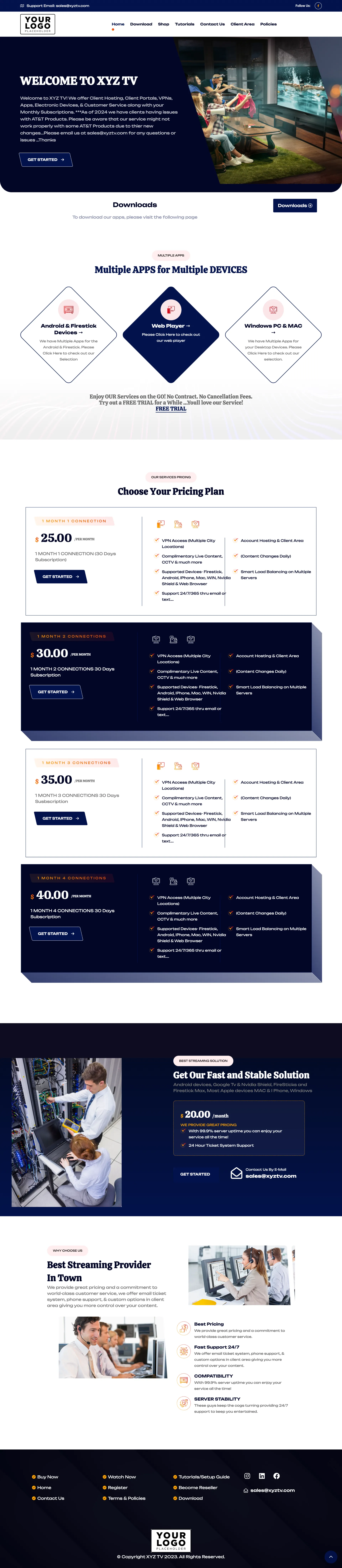
SkyVision is a clean and professional IPTV WordPress theme designed for IPTV providers, OTT platforms, streaming businesses, and digital television services.
Its navy blue and white color scheme, structured pricing layout, device support sections, download area, service highlights, and business-focused design make it suitable for companies that want a trustworthy and professional online presence.
The theme is built to present your IPTV services clearly while helping visitors understand your plans, supported devices, applications, service benefits, and ordering process.
Professional Corporate Design
SkyVision uses a clean business-style layout with strong navy blue sections, white backgrounds, clear typography, and well-organized content blocks.
The homepage includes a prominent introduction section where you can display your main service message, business description, featured image, and a direct call-to-action button.
This design is ideal for IPTV providers that prefer a professional company appearance instead of a highly animated or entertainment-focused layout.
Core Features
- Custom WordPress Theme: A professionally designed IPTV website theme built for WordPress.
- Corporate Blue Styling: A clean navy blue and white design suitable for professional IPTV and streaming businesses.
- Service-Focused Hero Section: Present your business introduction, IPTV services, promotional message, and primary order button.
- Application Download Section: Provide customers with access to supported IPTV applications and setup files.
- Multiple Device Support: Showcase Android, Firestick, Web Player, Windows, macOS, and other supported platforms.
- Flexible Pricing Plans: Display packages based on subscription duration, connections, pricing, and included features.
- Featured Package Styling: Highlight selected pricing plans using the premium navy blue card design.
- Service Benefits: Present your pricing, support, compatibility, uptime, and reliability advantages.
- Technical Support Section: Promote server management, support availability, and customer assistance.
- Contact Information: Display your business email, social links, and customer support details.
- WHMCS-Ready Ordering: Connect your pricing and action buttons to WHMCS products or another checkout platform.
- Responsive Layout: Optimized for desktop, tablet, and mobile devices.
Service Introduction Section
The homepage introduction area allows you to explain your IPTV service and present your main offer in a clear and professional format.
You can customize:
- Business name and logo
- Main headline
- Service description
- Featured image
- Promotional text
- Get Started button
- Order and contact links
This section helps visitors quickly understand your service and directs them toward your preferred purchasing process.
Application Downloads
SkyVision includes a dedicated download area where customers can access supported applications, setup files, installation guides, or related resources.
The download buttons can link to:
- Android applications
- Firestick applications
- Windows applications
- macOS applications
- Smart TV applications
- Setup guides
- External download pages
- Your customer portal
Application names, files, descriptions, and links can be changed according to your business requirements.
Multiple Apps for Multiple Devices
A dedicated device section helps customers understand how they can use your service.
You can showcase support for:
- Android phones and tablets
- Android TV
- Amazon Firestick
- Web Player
- Windows computers
- macOS computers
- Smart TVs
- Other compatible streaming devices
Each device card can include a title, icon, short description, and setup or download link.
Flexible IPTV Pricing Plans
The pricing section allows you to display multiple subscription plans in a structured and easy-to-compare format.
Each package can include:
- Plan name
- Subscription duration
- Number of connections
- Price
- Live channel access
- Movies and television series
- Supported devices
- Customer support information
- Account activation details
- Direct order button
Plans can be displayed using alternating white and navy blue layouts to make important packages more visible.
All prices, durations, features, connection limits, and order links can be customized.
Support and Stability Promotion
SkyVision includes a dedicated section where you can promote your technical support, hosting infrastructure, and service stability.
This area can be used to highlight:
- Fast and stable streaming
- Server uptime
- Technical support
- Customer assistance
- Account management
- Quick activation
- Reliable infrastructure
You can also display a support package, monthly management service, or direct contact information.
Why Choose Our Service
A separate business benefits section helps explain why customers should select your IPTV service.
You can present features such as:
- Best Pricing: Promote your subscription prices and package value.
- Fast Support: Display your available customer support channels and service hours.
- Device Compatibility: Confirm support for popular streaming devices and applications.
- Server Stability: Present your service reliability and availability information.
All headings, icons, images, and descriptions can be replaced with your own content.
WHMCS and Checkout Integration
SkyVision can connect its pricing, ordering, registration, and support buttons to your preferred billing platform.
You can:
- Link pricing plans to individual WHMCS products
- Connect Get Started buttons to your WHMCS cart
- Send customers to the WHMCS client area
- Link support buttons to WHMCS tickets
- Connect download links to your customer portal
- Use WooCommerce or another checkout system when preferred
WHMCS software and licenses are not included with the theme.
Customizable Website Content
SkyVision can be personalized according to your branding and service offering.
You can customize:
- Logo and business name
- Navy blue and white color styling
- Homepage text and headings
- Service images
- Application download links
- Device cards
- Subscription plans and prices
- Connection limits and package features
- Support information
- Business email and contact links
- Social media profiles
- Footer content
- WHMCS and checkout links
Ideal For
- IPTV service providers
- IPTV reseller businesses
- OTT and streaming platforms
- Live television subscription services
- Digital entertainment companies
- Video-on-demand businesses
- Streaming application providers
- Corporate IPTV brands
What You Need to Provide
To personalize and install the theme, please provide:
- An active domain name and compatible hosting
- Your business name and logo
- Your preferred colors and branding details
- Your subscription plans and prices
- Your package durations and connection limits
- Your application download links
- Your supported device information
- Your business email and contact details
- Your order and client-area links
- Your own website text and properly licensed images
- WordPress or hosting login details
- WHMCS access details if billing integration is required
Choose Your Installation & Setup Service
Select the installation option that best matches your requirements.
Free Installation Service — Included
- Theme Installation: We install and activate the SkyVision theme on your WordPress website.
- Logo Integration: We add your supplied logo to the theme.
- Demo Design Setup: The demo layout is installed and prepared for customization.
Premium Installation Service — $50
- Everything in Free Installation: Theme installation, activation, demo setup, and logo integration are included.
- Basic Configuration: We configure your business details, colors, contact information, and theme settings.
- Pricing Setup: Your supplied plans, prices, connection limits, and features are added.
- Download Setup: Your supplied application and setup-guide links are configured.
- WHMCS Integration: We connect your order, client-area, and support buttons.
- Launch-Ready Setup: Your website is prepared using the information you provide.
Ultimate SEO Setup Service — $100
- Everything in Premium Installation: Complete theme setup, pricing, downloads, branding, and WHMCS links are included.
- SEO Configuration: Page titles, meta descriptions, sitemap, and search visibility settings are configured.
- Google Search Console: Website verification and basic setup are included.
- Google Analytics: Analytics tracking is installed and configured.
- SEO Plugin Setup: A suitable WordPress SEO plugin is installed and configured.
- Speed Optimization: Basic caching, image optimization, and performance settings are configured.
Service Notes: Premium plugin licenses, WHMCS licenses, hosting, domain registration, paid images, and third-party services are not included unless clearly stated or supplied by you. SEO setup improves the technical foundation of the website but does not guarantee rankings, traffic, or sales.
Important Content Notice
This product includes the WordPress theme and selected installation service only.
IPTV subscriptions, television channels, streaming servers, applications, movies, television series, content licenses, and media rights are not included.
Demo prices, images, company details, service claims, logos, and contact information should be replaced with accurate and properly licensed content from your own business before publishing.
Conclusion
SkyVision IPTV WordPress Theme provides a clean, reliable, and business-focused foundation for IPTV and streaming companies.
Its professional navy blue design, clear pricing plans, device compatibility section, application downloads, support presentation, service benefits, and WHMCS-ready ordering make it a strong choice for providers who want a trustworthy and user-friendly IPTV website.