
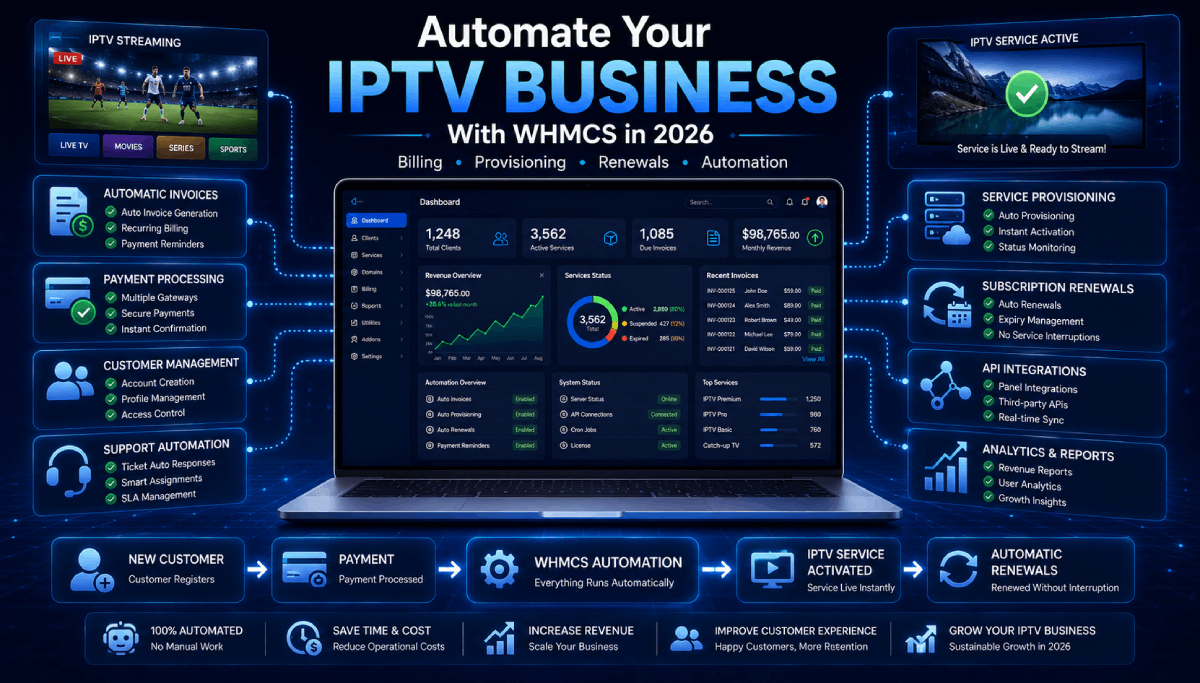
Running an IPTV or OTT subscription business involves much more than selling access. You must process orders, create services, collect payments, renew subscriptions, manage customers, answer support requests, and protect your platform from fraud.
Handling these tasks manually may work with a small customer base, but it becomes increasingly difficult as the business grows. This is where IPTV WHMCS automation can make a significant difference.
With the right WHMCS modules, you can connect your billing system to supported IPTV panels and automate much of the customer lifecycle.
What Is IPTV WHMCS Automation?
WHMCS is a billing, customer management, and support platform widely used by online service providers. IPTV WHMCS automation connects this billing platform with an IPTV or OTT reseller panel.
Instead of manually creating an account after every order, an integration module can send the required information to the connected panel automatically.
A typical automated workflow looks like this:
- A customer selects a subscription package.
- WHMCS creates the order and invoice.
- The customer completes payment.
- The connected module creates the IPTV service.
- Login information is delivered to the customer.
- The service is renewed, suspended, or terminated according to its WHMCS billing status.
This reduces repetitive administration and gives customers a faster ordering experience.
Essential Areas You Can Automate
1. Account Provisioning
Automated provisioning creates a customer account or IPTV line after an order has been approved or paid. Depending on the connected panel, the module may also assign a package, expiry date, credentials, device information, or selected bouquets.
This helps prevent typing mistakes and removes delays caused by manually processing every new order.
2. Subscription Renewals
When a customer pays a renewal invoice, WHMCS can instruct the connected panel to extend the service automatically. Customers receive continued access without waiting for an administrator to update the account.
Automated renewal is especially valuable for businesses managing hundreds or thousands of recurring subscriptions.
3. Suspension and Unsuspension
If an invoice remains unpaid, WHMCS can suspend the associated service according to your automation settings. After the customer pays, the service can be restored automatically.
This creates a consistent billing policy while reducing manual account checks.
4. Package and Bouquet Management
Some IPTV integrations allow administrators to map different panel packages to WHMCS products and billing cycles. Advanced modules may also let customers choose or update available bouquets from the order form or client area.
This provides greater flexibility while keeping package control inside your billing workflow.
5. Credential Delivery
After activation, customers need clear access to their service information. A properly integrated client area can display details such as:
- Username and password
- Service status
- Expiry or next due date
- M3U playlist URL
- Portal URL
- MAG or device information
Automated welcome emails can also deliver setup details immediately after activation.
Improve the Customer Ordering Experience
Automation should not stop at service creation. Your website, checkout, payment options, and client area all influence whether visitors become paying customers.
Use a Professional IPTV Website
A well-designed IPTV WordPress theme can clearly present your packages, supported devices, service benefits, application downloads, frequently asked questions, and contact options.
Connect each pricing button to the correct WHMCS product so customers can move from browsing to checkout without confusion.
Offer Relevant Payment Gateways
Customers are more likely to complete an order when they recognize and trust the available payment methods. Depending on your target market, you may consider card payments, local payment providers, mobile wallets, bank-transfer options, or supported cryptocurrency gateways.
A smart gateway-management addon can also display payment methods according to the selected product or product group.
Provide Free Trials Carefully
A free trial can reduce purchase hesitation, but unrestricted trials may attract abuse. A WHMCS free-trial module can help control eligibility, trial duration, cart limits, reminders, and repeat usage.
Use trials to demonstrate service quality while maintaining clear limits for each customer and product.
Protect Your Business from Fraud and Spam
Automating orders without proper safeguards can allow fake accounts, disposable emails, repeated trials, or suspicious transactions to reach your platform.
Useful protection measures include:
- Email verification before registration or ordering
- Disposable-email and suspicious-domain blocking
- Signup limits based on IP address
- Device fingerprint and location checks
- VPN or proxy risk detection
- Invite-only registration for private services
- Product purchase limits
The appropriate controls depend on your market, risk level, and onboarding process.
Automate Customer Communication
Customers expect fast information about orders, invoices, activations, renewals, and support tickets. WHMCS notification modules can send important events through channels such as Telegram, Discord, SMS, and email.
For administrators, real-time notifications can improve response times. For customers, timely reminders can reduce missed payments and service interruptions.
Use AI Without Removing Human Control
AI can help support teams prepare answers for repetitive setup and troubleshooting questions. However, billing disputes, refunds, account security, legal complaints, and other sensitive matters should remain under human review.
A responsible AI support workflow should include confidence thresholds, privacy protection, rate limits, spam controls, safety filters, editable drafts, and detailed logs.
Choosing the Right WHMCS IPTV Module
Before purchasing an integration, confirm that it supports your exact panel and required authentication method. Panel names can be similar while their APIs and capabilities differ significantly.
Review the following points:
- Supported IPTV or OTT panel
- API key, token, or login-based authentication
- Account creation and lifecycle automation
- Supported line and device types
- Package and billing-cycle mapping
- Bouquet selection and management
- Multi-panel support
- Client-area service information
- Synchronization and logging tools
- Compatibility with your WHMCS and PHP environment
Always test the complete workflow in a development environment before processing live customer orders.
A Practical Automation Checklist
- Connect WHMCS to your supported IPTV panel.
- Create products for each package and billing cycle.
- Configure provisioning, renewal, suspension, and termination actions.
- Connect your website pricing buttons to WHMCS order forms.
- Configure suitable payment gateways.
- Add email verification and fraud-prevention controls.
- Prepare welcome emails and setup instructions.
- Configure invoice and expiry reminders.
- Test successful, failed, overdue, renewed, and cancelled orders.
- Monitor logs and panel credit balances regularly.
Final Thoughts
IPTV WHMCS automation can help a legitimate streaming business operate more efficiently by connecting sales, billing, provisioning, customer communication, and service management.
The best results come from combining a compatible OTT integration with a professional website, reliable payment methods, sensible fraud controls, clear support processes, and properly licensed content.
Explore our collection of WHMCS OTT modules, WHMCS addons, payment gateway integrations, and WordPress IPTV themes to build a more automated customer experience.