OTT Master Panel for WHMCS

$249.00 USD

The OTT Master Panel For WHMCS automates IPTV users, MAG devices, resellers, credits, bouquets, renewals, and service management across multiple supported OTT panels.

Included:

  • 7-Day Free Trial Access
  • Multi-Level Technical Support
  • One-Time Payment, No Recurring Fees
  • Lifetime Owned License
  • Instant Download After Purchase
  • Latest WHMCS Compatible

Description

Product Description

The OTT Master Panel For WHMCS is a combined addon and provisioning module for businesses operating IPTV and OTT services through multiple reseller platforms.

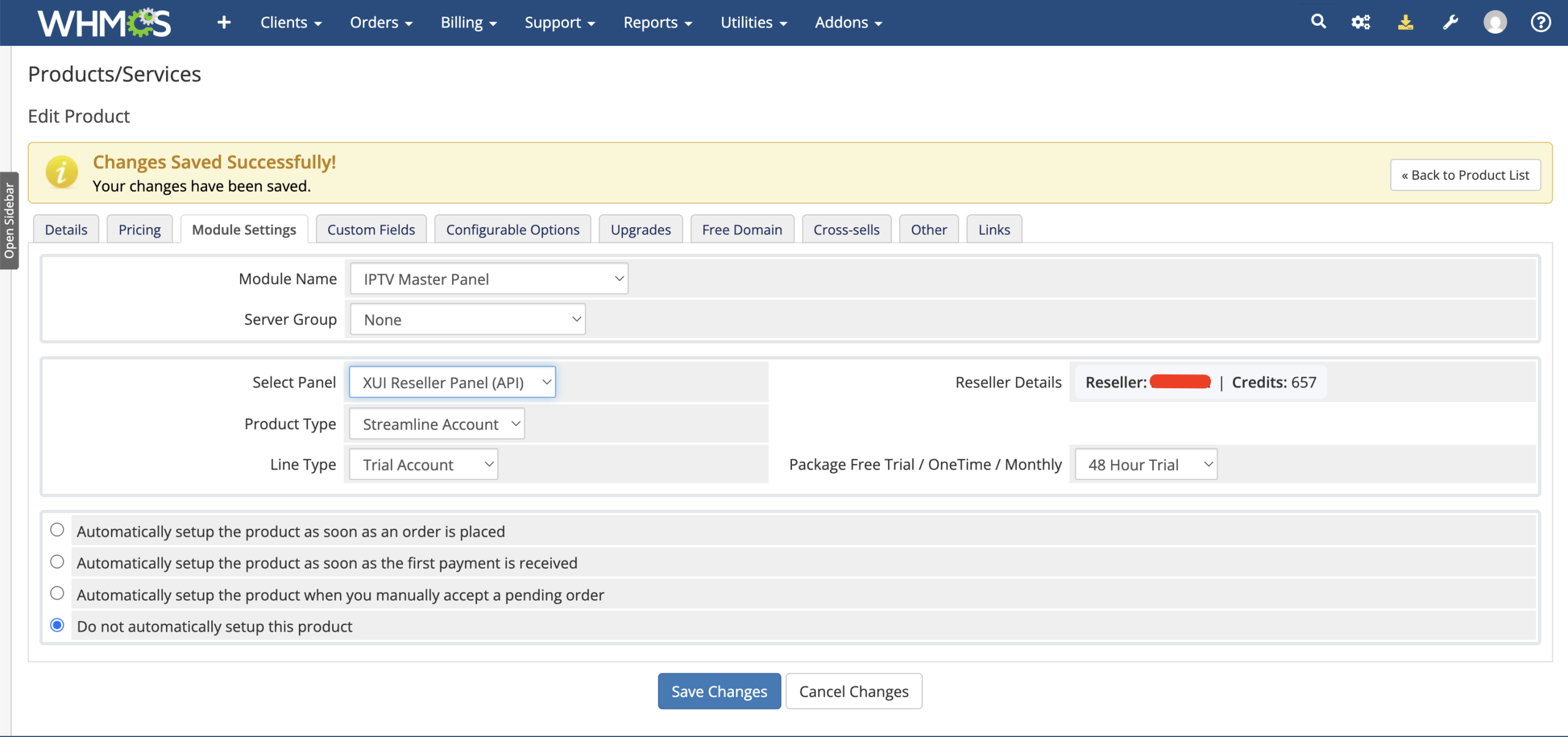
Connect supported panels using their available API or administrator-login method, map panel packages to WHMCS billing cycles, assign bouquets, and automate the creation and management of Streamline, MAG, reseller-account, and reseller-credit products.

The module brings panel management, WHMCS provisioning, customer service details, credential controls, panel synchronization, welcome emails, activity logs, and low-credit monitoring into one integrated workflow.

Supported OTT Panels

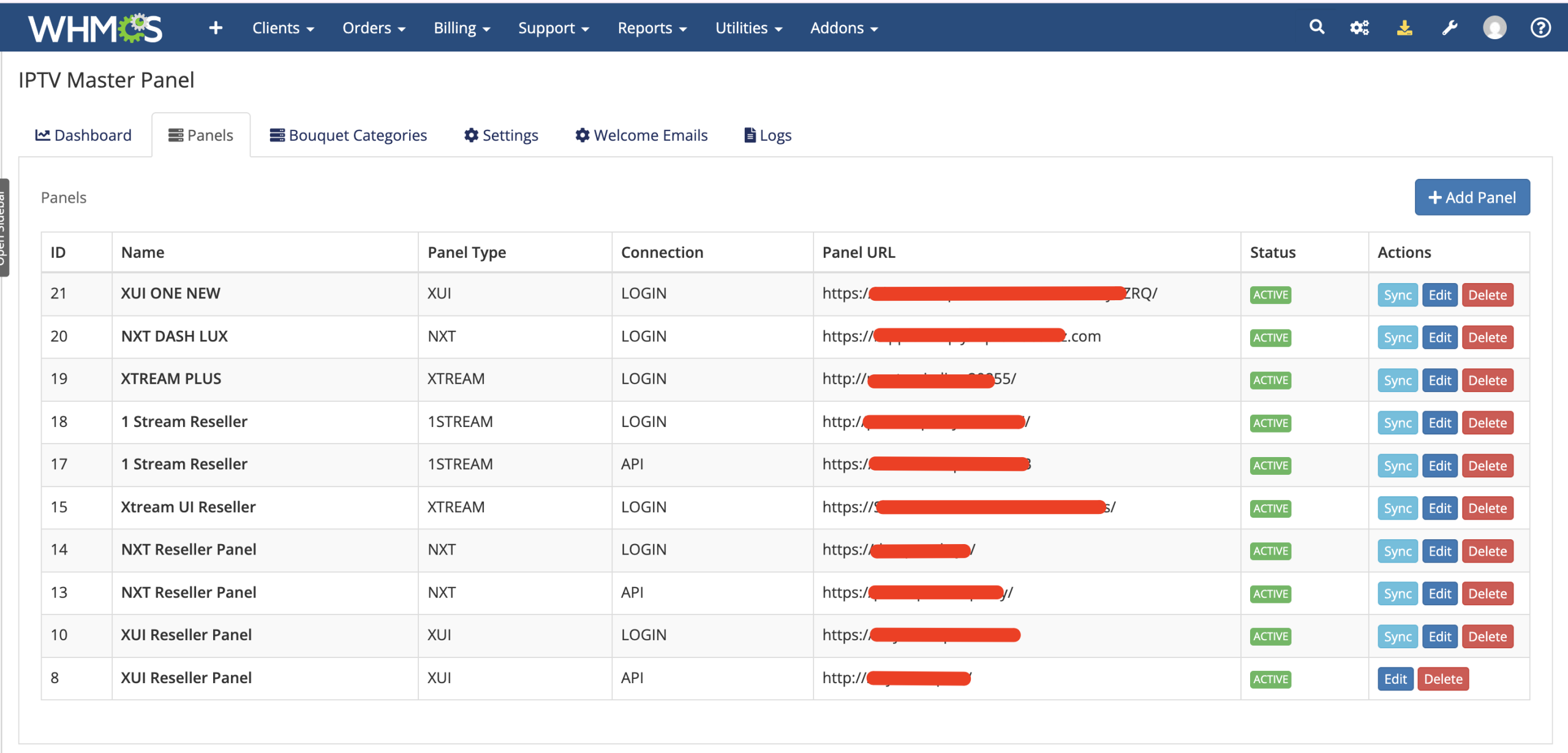
  • XUI One: Supports configured login or API integration.
  • NXT Dash: Supports configured login or API integration.
  • Xtream UI: Uses administrator-login integration in this module version.
  • OneStream: Supports configured login or API integration.

Available actions and customer controls can vary according to the selected panel, product type, and connection method.

How It Works

  1. Add Your Panels: Save each supported OTT platform with its URL, connection type, and required credentials.
  2. Verify the Connection: Test panel access before the configuration is stored.
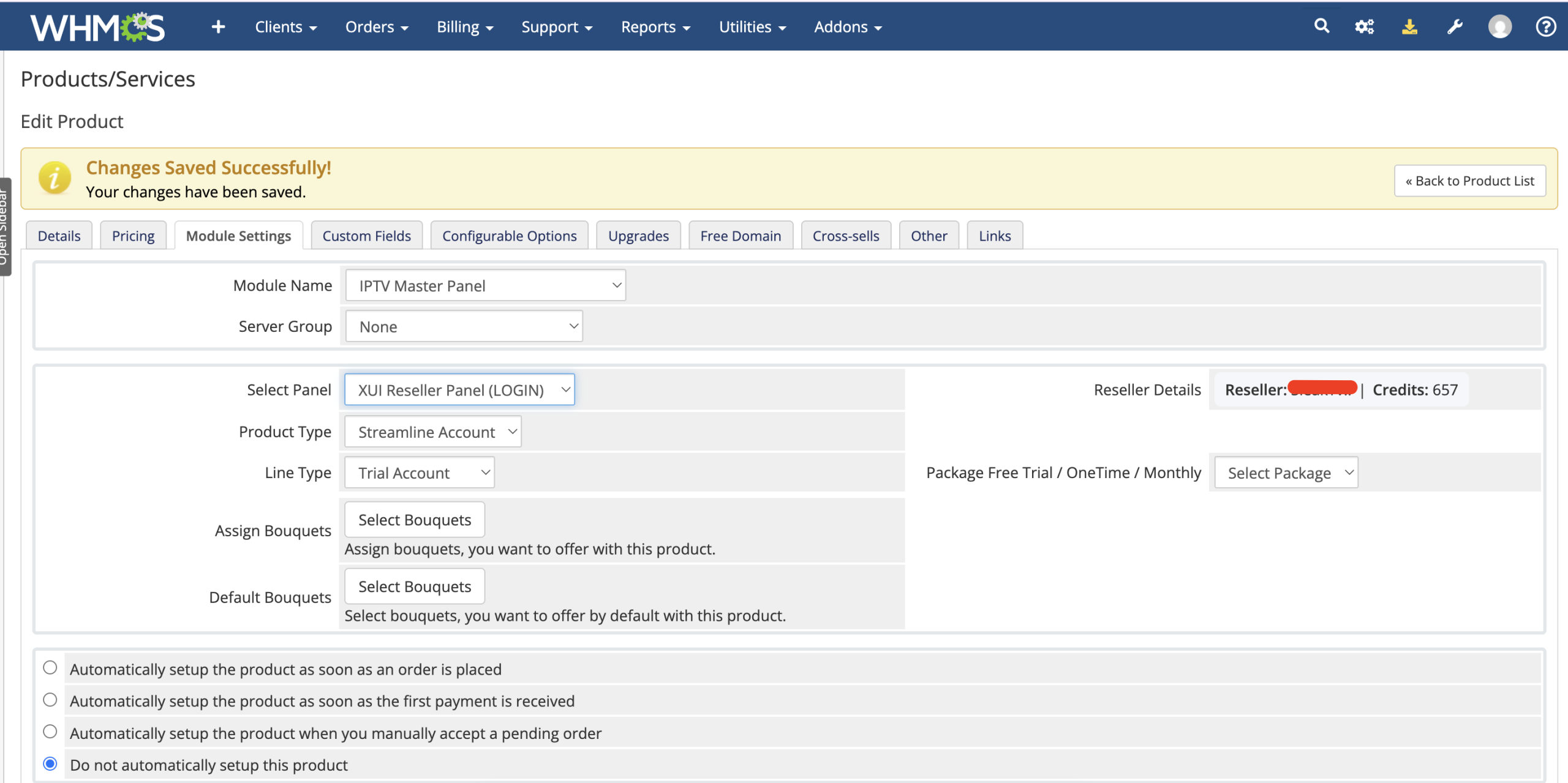
  3. Create a WHMCS Product: Select the OTT panel and choose the service type offered by the product.
  4. Map Panel Packages: Assign different remote packages to the applicable WHMCS billing cycles.
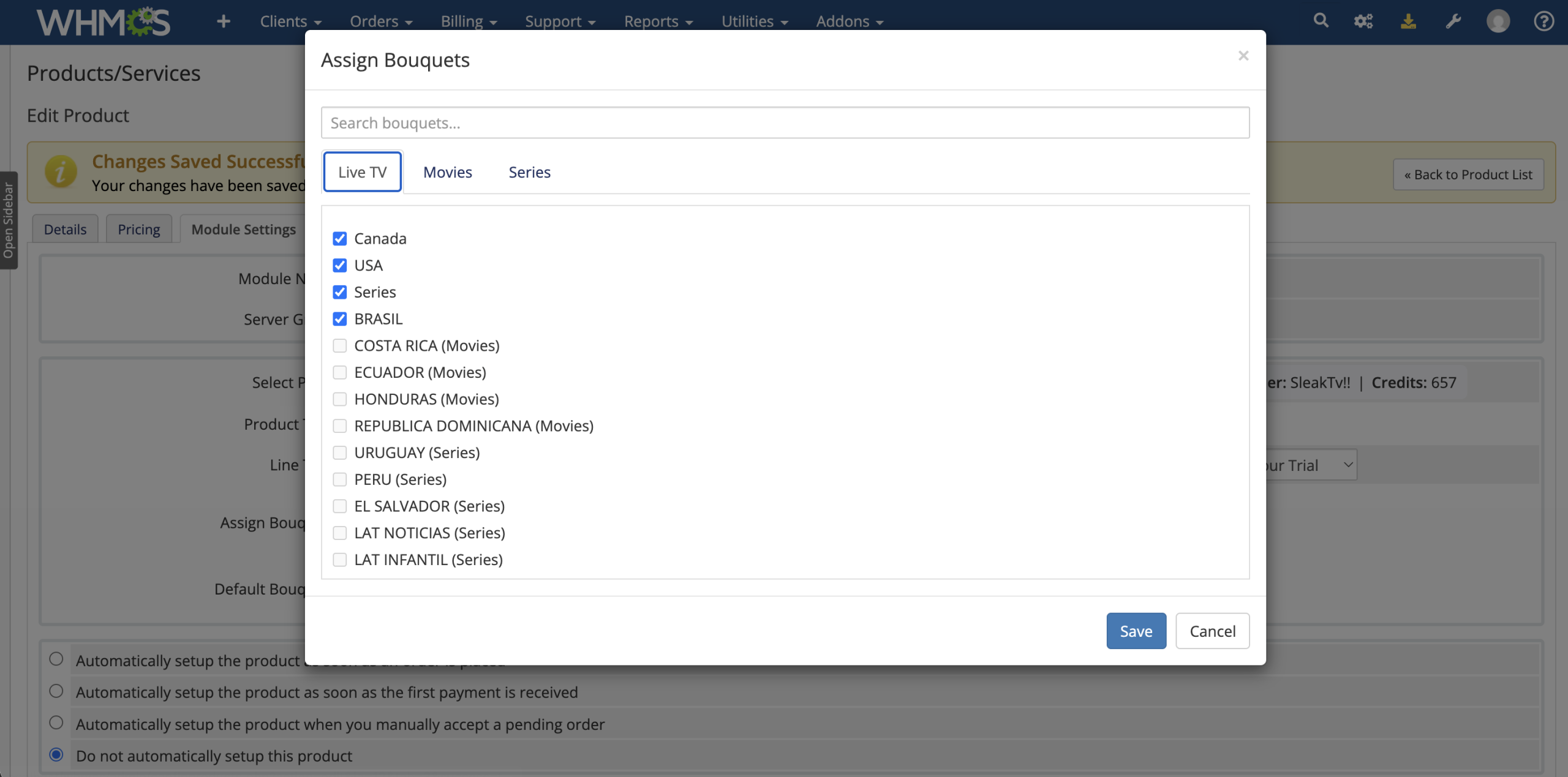
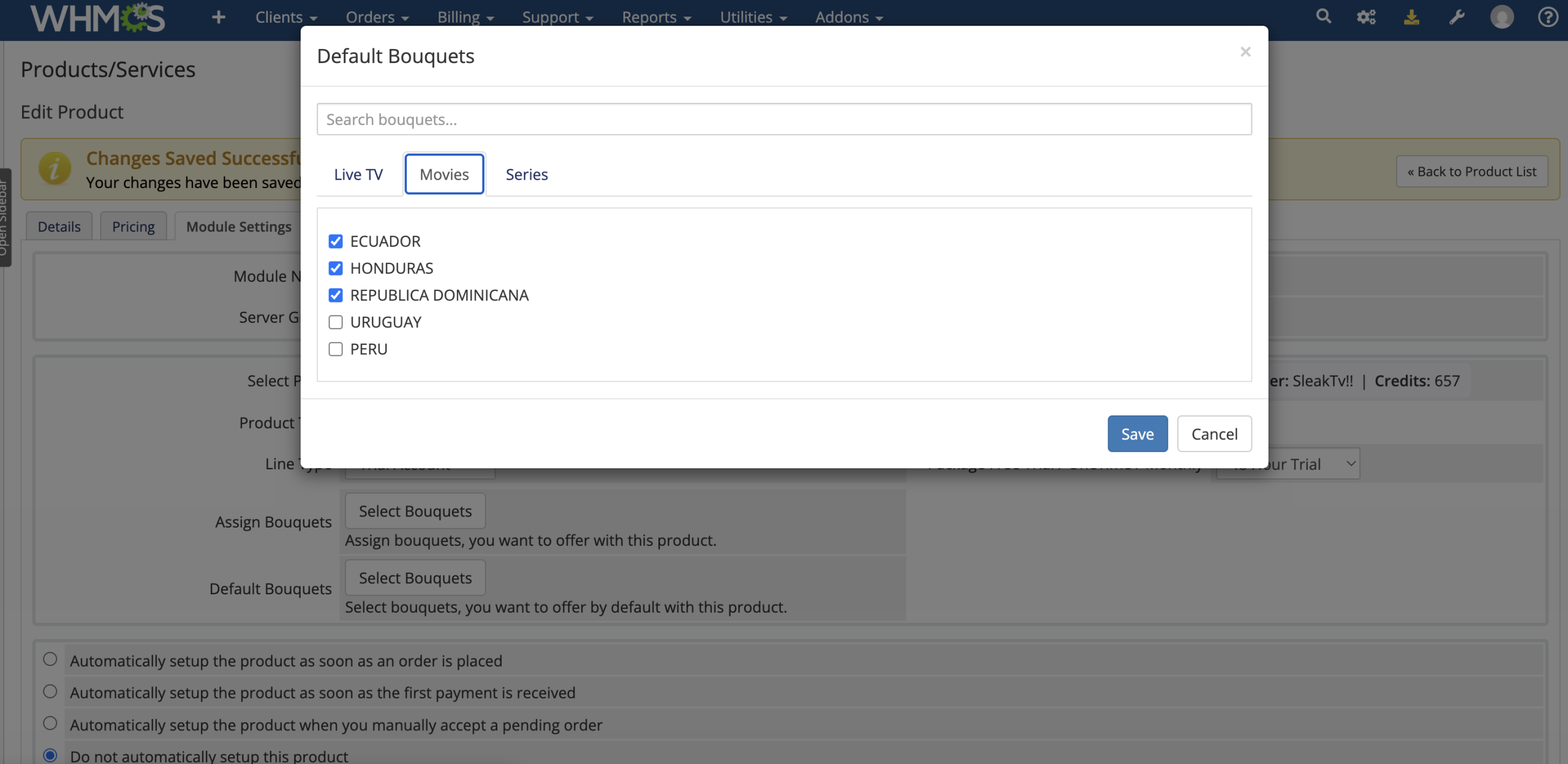
  5. Configure Bouquets: Select the content groups available to customers and define defaults.
  6. Accept the Order: Validate customer-supplied details and provision the account on the connected panel.
  7. Manage the Lifecycle: Renew, suspend, unsuspend, terminate, or change packages through standard WHMCS module actions.

Product Types

  • Streamline Account: Provision username-and-password IPTV lines.
  • MAG Account: Provision services associated with a customer-supplied MAC address.
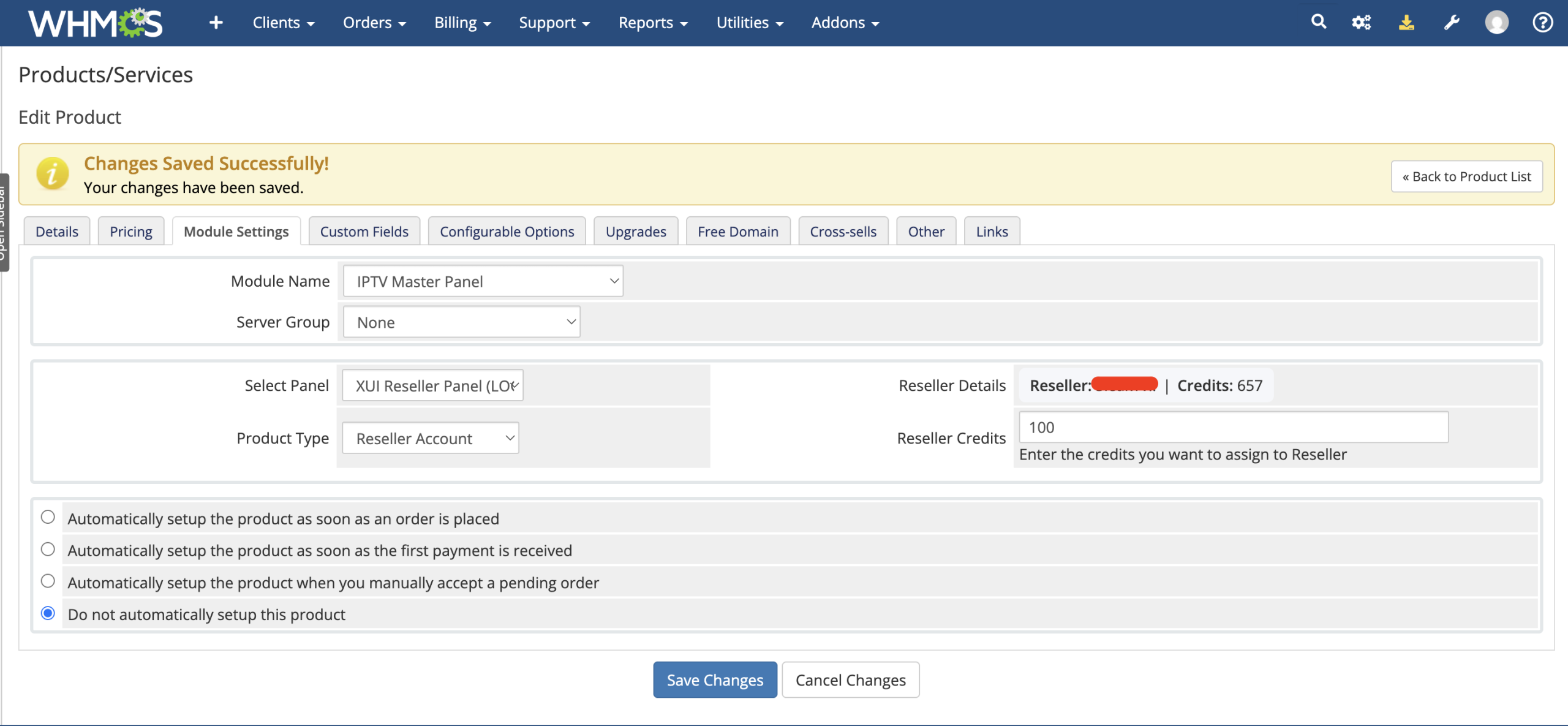
  • Reseller Account: Create a new reseller login and assign the configured credit amount.
  • Reseller Credits: Validate an existing reseller and add the configured credits.

Core Features

  • Multi-Panel Management: Store and manage multiple supported OTT reseller panels from WHMCS.
  • API and Login Connections: Use the integration method supported by the selected platform.
  • Connection Testing: Validate panel credentials before saving a new or updated connection.
  • Automated Provisioning: Create supported customer and reseller services through WHMCS.
  • Service Renewals: Extend eligible accounts using the package mapped to the service billing cycle.
  • Lifecycle Actions: Support suspend, unsuspend, terminate, and change-package operations.
  • Trial and Official Lines: Configure products using trial or standard panel packages.
  • Bouquet Management: Retrieve, organize, assign, and update available content bouquets.
  • Customer Validation: Check usernames, MAC addresses, and reseller usernames before ordering.
  • Panel Synchronization: Pull supported active service details back into WHMCS.

WHMCS Billing-Cycle Mapping

Assign a different remote panel package to each supported WHMCS billing period, allowing one product to deliver the correct duration according to the customer’s order.

  • Free Trial, One-Time, or Monthly
  • Quarterly
  • Semi-Annually
  • Annually
  • Biennially
  • Triennially

Bouquet Management

  • Remote Bouquet Retrieval: Load available bouquets from the selected panel and package.
  • Product Assignment: Choose which bouquets can be offered with a WHMCS product.
  • Default Selection: Preselect specific bouquets for customers when appropriate.
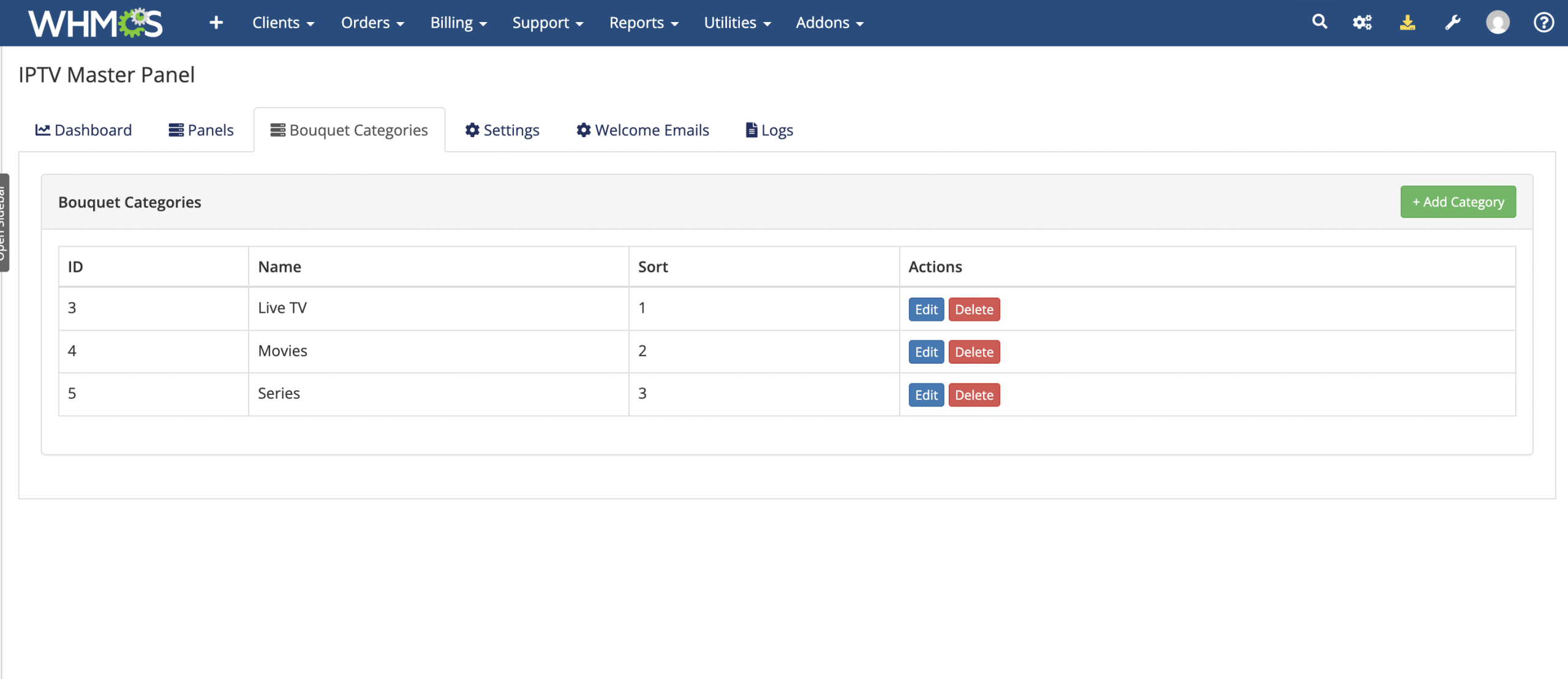
  • Custom Categories: Create local bouquet categories and control their display order.
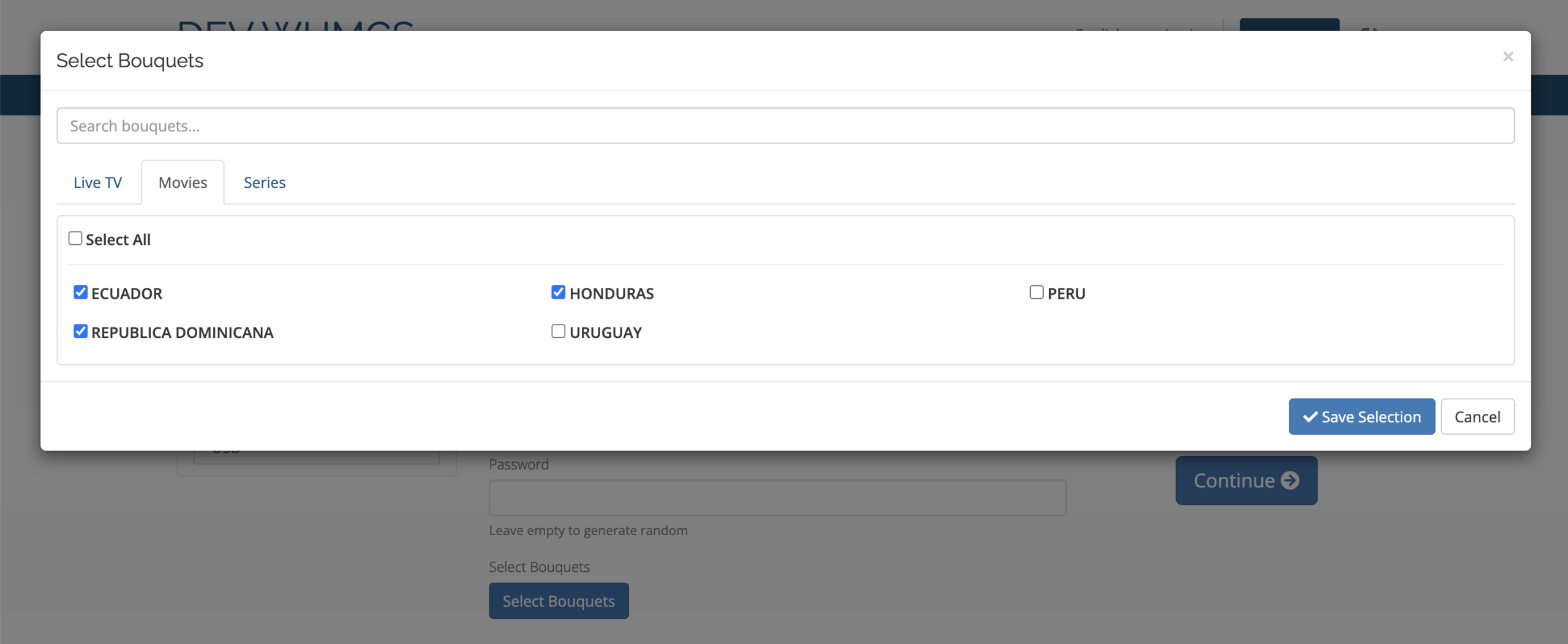
  • Searchable Selection: Find bouquets through the built-in selection interface.
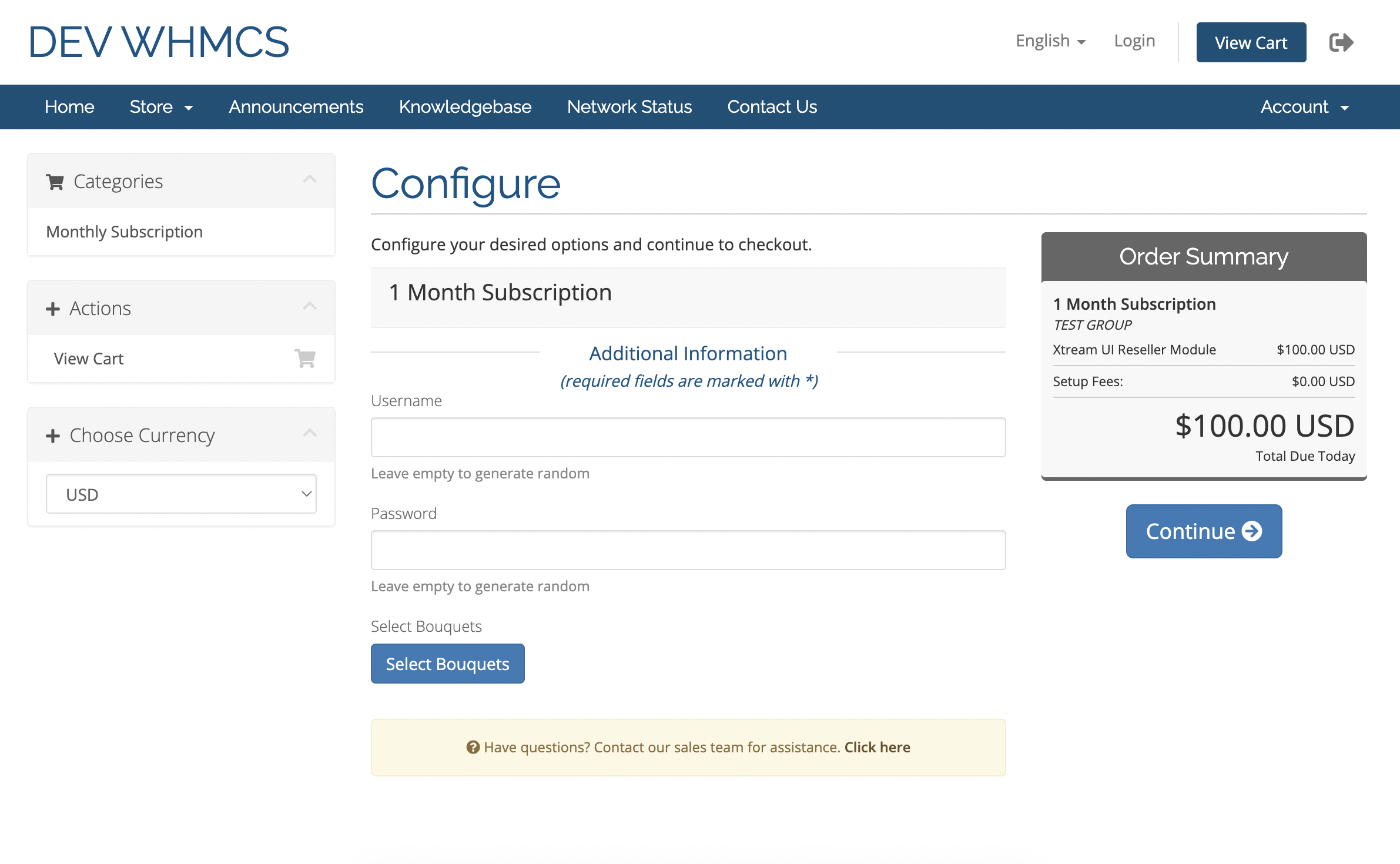
  • Customer Choice: Let clients select available bouquets during ordering when configured.
  • Post-Purchase Updates: Allow eligible clients to change bouquets from the service page.

Order Validation

  • Check whether a requested Streamline username already exists.
  • Validate the format and availability of a MAG address.
  • Require a new reseller username to be unused for reseller-account products.
  • Require an existing reseller username for reseller-credit products.
  • Display validation errors before the customer completes the order.

Automated Service Management

  • Create: Provision the configured line, MAG device, reseller, or credit top-up.
  • Renew: Extend eligible services using the mapped panel package.
  • Suspend: Disable supported lines when WHMCS invokes suspension.
  • Unsuspend: Restore a supported suspended service.
  • Terminate: Remove the associated line or device from the panel.
  • Change Package: Update eligible services when their WHMCS product configuration changes.
  • WHMCS Data Update: Store remote identifiers, credentials, and available expiry information against the service.

Reseller Automation

  • Create reseller accounts on supported connected panels.
  • Assign the credit quantity configured on the WHMCS product.
  • Sell additional credits to an existing validated reseller.
  • Store reseller credentials in the associated WHMCS service.
  • Add configurable reseller notes containing service, order, and customer variables.
  • Provide a dedicated reseller client-area credential view.
  • Allow supported reseller credential changes according to panel capabilities.

Customer Area Experience

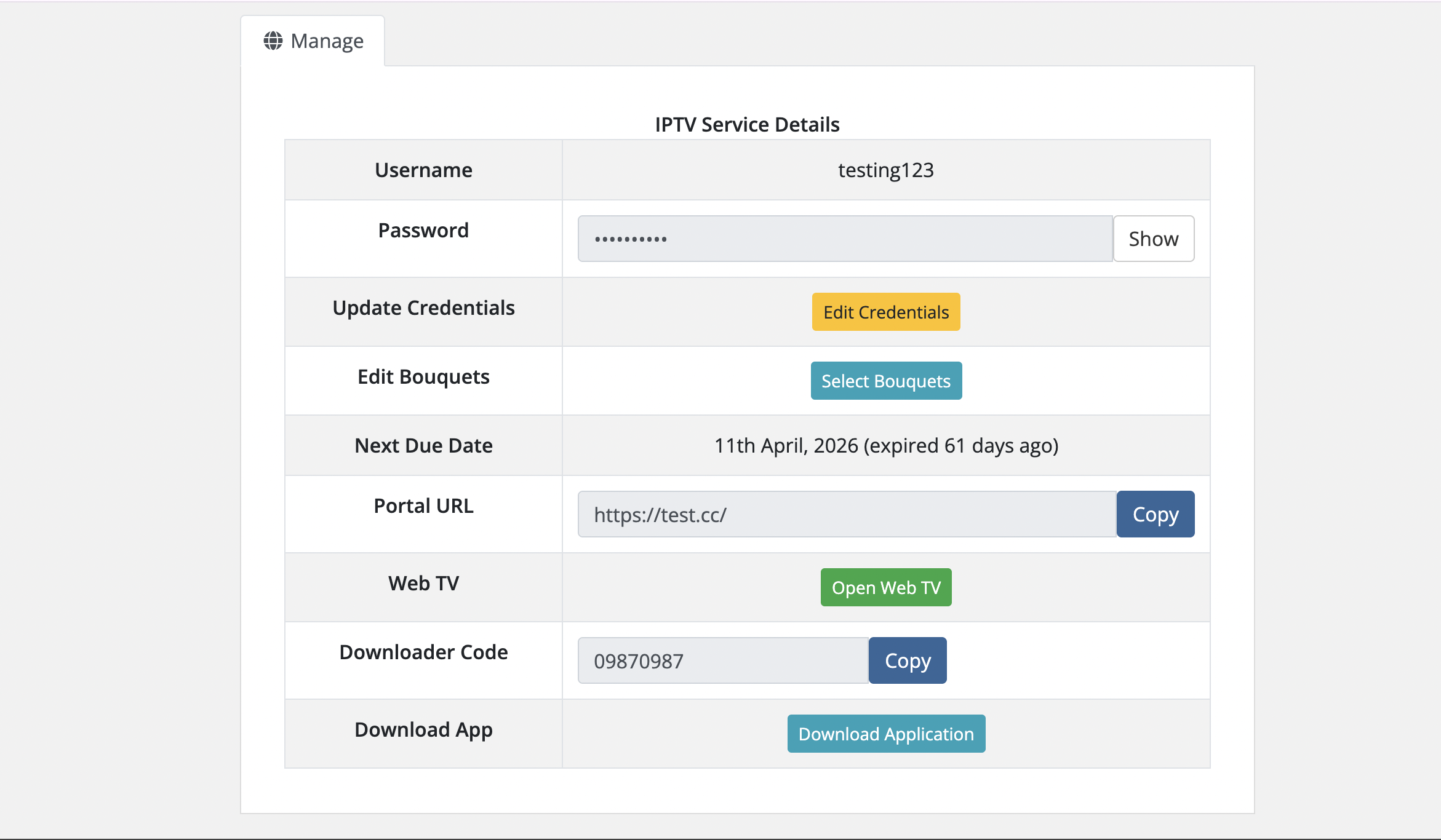
  • View the service username and reveal the stored password.
  • View and copy the configured MAG address.
  • See the next due date with a readable countdown.
  • Copy the configured M3U or MAG portal URL.
  • Open the optional Web TV destination.
  • Copy an optional downloader code.
  • Open the configured application download link.
  • Update credentials when supported by the panel and connection method.
  • Review and update bouquet selections when that capability is available.

Credential Generation

  • Random Generation: Set username and password length with numeric, alphabetic, alphanumeric, or special-character options.
  • Custom Formats: Build credentials using service, order, customer-name, and random-value placeholders.
  • Customer Input: Permit optional customer-supplied credentials for applicable products.
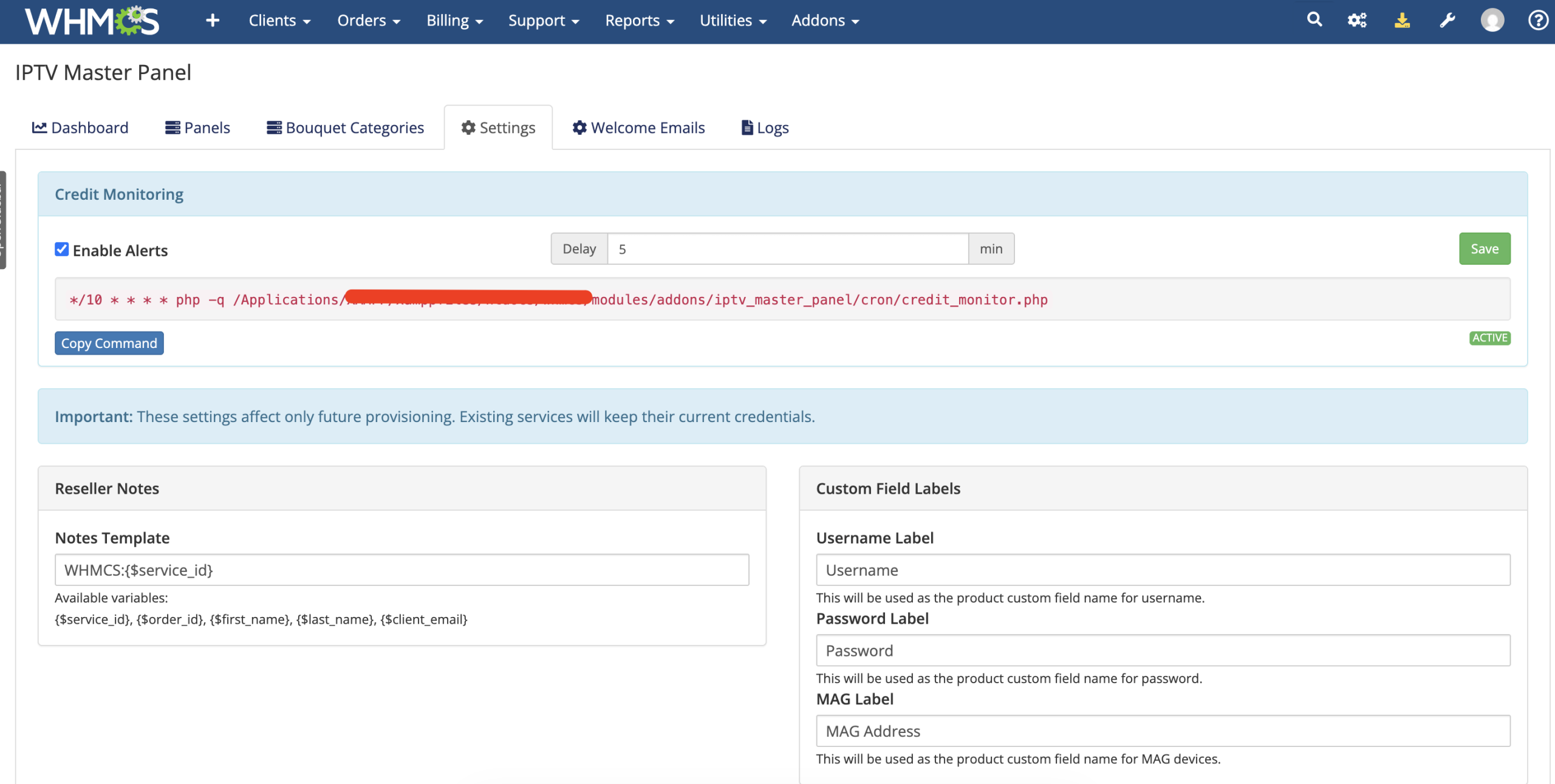
  • Custom Field Labels: Rename the username, password, and MAG fields to suit your storefront.

Panel Synchronization

The administrator can run a batched synchronization for supported panel connections and active WHMCS services.

  • Process active services in small batches with visible progress.
  • Search remote Streamline accounts by username.
  • Search remote MAG accounts by their device address.
  • Update credentials, remote account IDs, and next due dates when returned.
  • Update related WHMCS custom-field values.
  • Record synchronization errors in WHMCS activity logs.

Synchronization availability depends on the panel connection; the current interface excludes XUI One API connections from this manual sync process.

Low-Credit Monitoring

  • Set a minimum credit balance separately for each panel.
  • Enable or disable scheduled credit monitoring globally.
  • Use the provided cron command for recurring checks.
  • Send a WHMCS administrator email when credits fall below the configured threshold.
  • Set a delay between repeat alerts to reduce notification frequency.
  • Record alert activity and monitor errors in the WHMCS activity log.

Email Templates

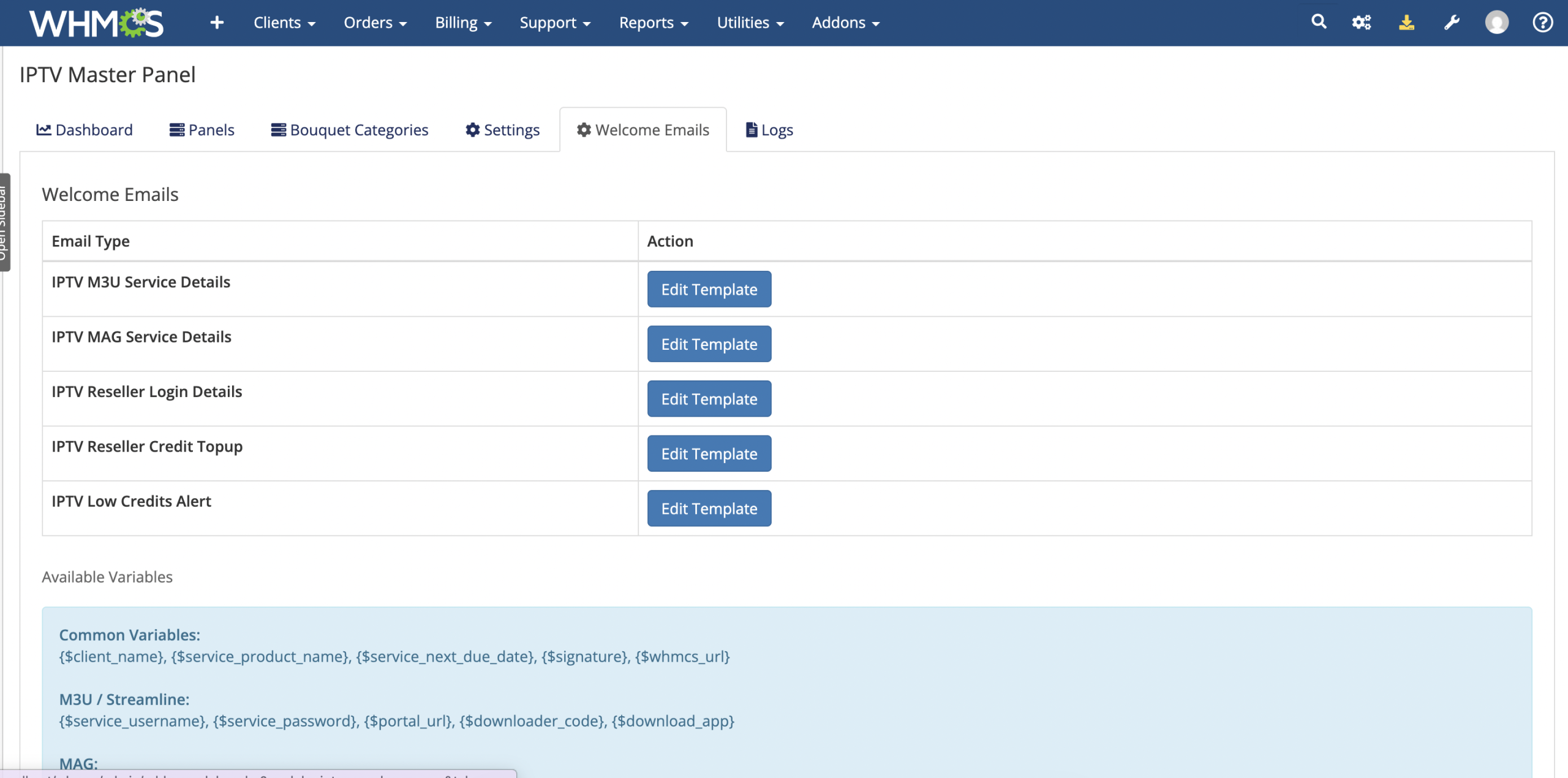
Module activation installs dedicated WHMCS email templates that administrators can edit through the standard email-template area.

  • IPTV M3U Service Details
  • IPTV MAG Service Details
  • IPTV Reseller Login Details
  • IPTV Reseller Credit Top-Up
  • IPTV Low Credits Alert

Administrator Features

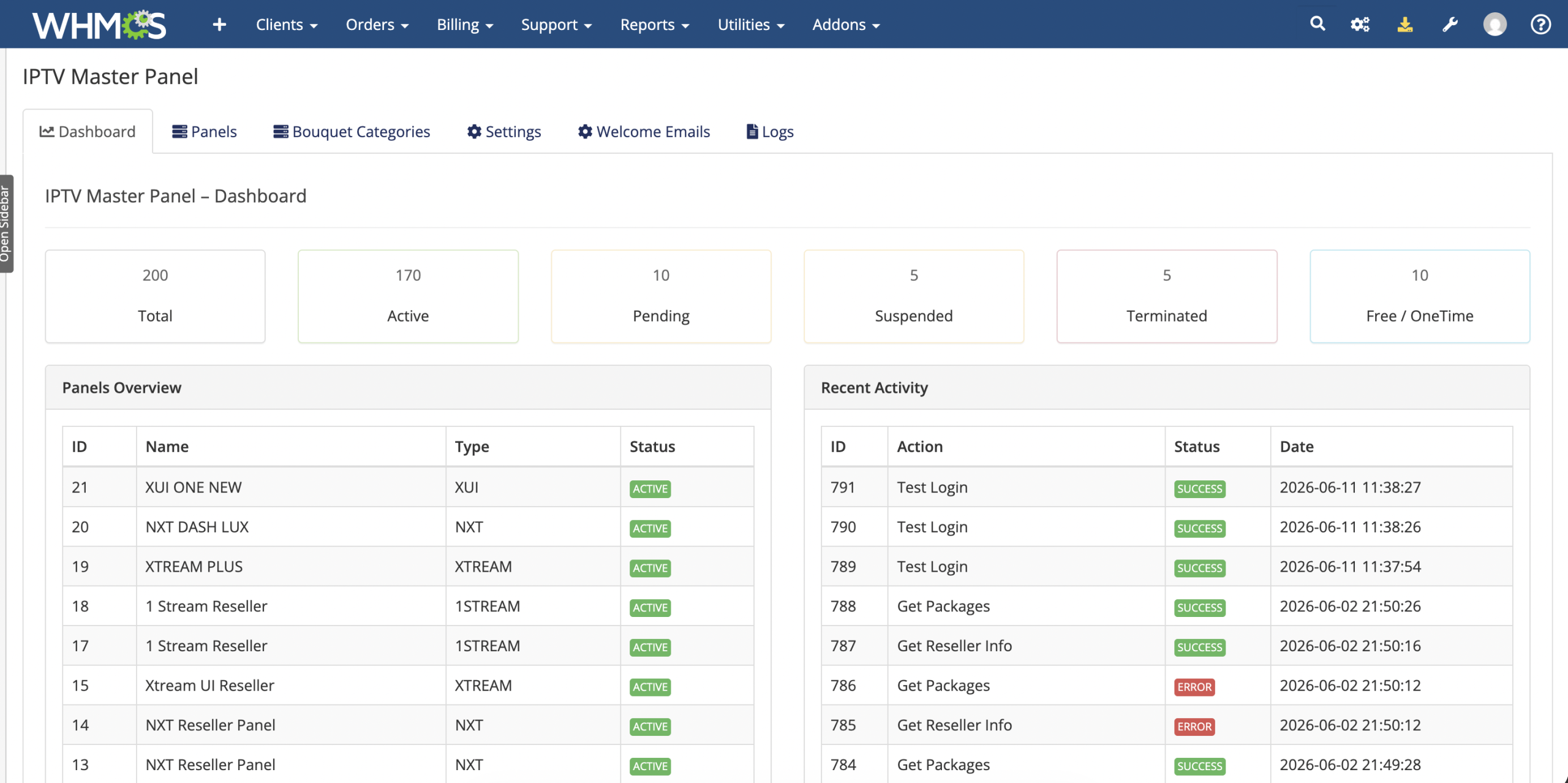
  • View total, active, pending, suspended, terminated, and free or one-time IPTV service counts.
  • Review connected panels and recent module activity from the dashboard.
  • Add, edit, activate, deactivate, or delete panel connections.
  • Store customer-facing portal URLs, Web TV links, downloader codes, and application links per panel.
  • View reseller information and available credits while configuring products.
  • Manage bouquet categories and their display order.
  • Open installed welcome-email templates for customization.
  • Review paginated panel activity logs with action, service, response, and status details.
  • Clear stored API logs when no longer required.

Business Benefits

  • Centralize OTT Operations: Manage products linked to several reseller platforms through one WHMCS installation.
  • Reduce Manual Provisioning: Create and manage customer services through standard WHMCS actions.
  • Sell More Service Types: Offer Streamline, MAG, reseller-account, and credit-top-up products.
  • Align Panel and Billing Durations: Map remote packages to WHMCS payment cycles.
  • Improve Customer Self-Service: Display access details and supported management controls in the client area.
  • Protect Panel Availability: Receive scheduled alerts before reseller credits become critically low.
  • Improve Operational Visibility: Review service statistics, API responses, and recent activity.

Ideal For

  • IPTV and OTT service providers
  • Businesses operating multiple reseller panels
  • Providers selling M3U and MAG subscriptions
  • Companies creating reseller accounts
  • Sellers offering reseller credit top-ups
  • WHMCS businesses seeking centralized OTT automation

Why Choose OTT Master Panel For WHMCS?

OTT Master Panel combines four supported panel adapters with WHMCS product mapping, automated service actions, reseller and credit products, bouquet selection, customer tools, synchronization, email templates, credit monitoring, and detailed logs.

It gives OTT providers one practical system for connecting panel operations with WHMCS ordering, billing, service delivery, and customer management.

What does OTT Master Panel for WHMCS do?

It centralizes and automates supported IPTV and OTT reseller-panel operations inside WHMCS, including service provisioning, renewals, account management, billing actions, synchronization, and client access.

Is this module compatible with the latest WHMCS version?

Yes, the module is compatible with the latest supported WHMCS version.

Is this module compatible with current PHP versions?

Yes, it supports the PHP versions compatible with the latest WHMCS release.

Which OTT reseller panels are supported?

The module supports implemented integrations for XUI ONE, NXT DASH, Xtream UI, and OneStream panels.

Can multiple panel types be managed from one WHMCS installation?

Yes, supported panel types can be connected and managed through a centralized WHMCS interface.

Can I connect more than one panel of the same type?

Yes, multiple supported reseller-panel connections can be configured.

Does the module support reseller and super-reseller panels?

Yes, supported reseller and super-reseller panel accounts can be managed.

How does the module connect to reseller panels?

It uses the authentication method supported by each integration, including API-based or login-based connections.

Are all panels connected using the same authentication method?

No, authentication depends on the selected panel and may use API keys, tokens, usernames and passwords, or login sessions.

Can I test a panel connection before using it?

Yes, supported connections can be validated using the administrative panel-management tools.

Can I assign different WHMCS products to different panels?

Yes, products can be mapped to the appropriate configured panel connection.

Can I move a product from one panel connection to another?

Product configuration can be changed, but existing service migration should be handled carefully to avoid mismatched remote accounts.

Does the module automatically create IPTV services?

Yes, supported services can be created automatically after the applicable WHMCS activation or order workflow.

Does it support both end-user and reseller accounts?

Yes, the module includes supported management workflows for IPTV users and reseller accounts.

Can it create Streamline accounts?

Yes, supported panel integrations can provision username-and-password IPTV lines.

Can it create MAG device accounts?

MAG provisioning is available for panel integrations and products that support MAC-based services.

Can it create reseller accounts?

Yes, supported reseller products can create and manage reseller accounts.

Can it assign credits to reseller accounts?

Yes, supported reseller workflows can assign and manage panel credits.

Can it automatically renew services after invoice payment?

Yes, supported services can be extended when the applicable WHMCS invoice is paid.

Can it suspend services for unpaid invoices?

Yes, supported panel integrations can disable services through the WHMCS suspension workflow.

Can it automatically restore a service after payment?

Yes, supported services can be re-enabled through the WHMCS unsuspension workflow after payment.

Can a service be terminated from WHMCS?

Yes, supported panel integrations can remove or terminate the corresponding remote service.

Can administrators change an IPTV package from WHMCS?

Yes, supported package-change actions can update the service without requiring a separate panel login.

Do all lifecycle actions work identically across every panel?

No, available actions depend on the capabilities and API behavior of the selected panel integration.

Can different packages be assigned to different billing cycles?

Yes, supported panel packages can be mapped to WHMCS billing cycles.

Which billing cycles can be mapped?

Supported mappings can include Free, One Time, Monthly, Quarterly, Semi-Annually, Annually, and other configured WHMCS cycles.

Can custom billing-cycle mappings be used?

Available custom mapping depends on the configuration controls provided for the selected integration.

Does package mapping change the WHMCS product price?

No, WHMCS pricing remains configured separately. Mapping selects the corresponding panel package for provisioning.

Can packages be retrieved from the connected panel?

Yes, supported integrations can load available packages during product configuration.

Can package information vary between panels?

Yes, each panel connection can provide its own package list, duration, credit, and connection details.

Does the module support bouquet management?

Yes, supported panel integrations can assign and manage channel bouquets or templates.

Can administrators set default bouquets for a product?

Yes, default bouquet selections can be configured for supported products.

Can customers choose bouquets while ordering?

Yes, supported product configurations can allow customers to select available bouquets during checkout.

Can customers update bouquets after ordering?

Yes, supported integrations can allow customers to manage bouquet selections from the client area.

Can administrators control bouquets for an individual service?

Yes, supported product and service workflows include administrative bouquet controls.

Do all supported panels use bouquets in the same way?

No, some panels use bouquet lists, while others use templates or package-based content assignments.

Can the module generate IPTV usernames and passwords?

Yes, supported service types can use automatically generated credentials.

Can credential formats be customized?

Yes, supported settings can define random or formatted username and password rules.

Can customers provide their preferred credentials?

This depends on the custom-field and credential options configured for the selected panel integration.

Are generated passwords stored securely in WHMCS?

Supported integrations use the WHMCS password-encryption workflow when saving service passwords.

Can panel credentials be synchronized back to WHMCS?

Yes, supported synchronization tools can update service credentials using panel data.

Can service expiry dates be synchronized?

Yes, supported panel information can update the corresponding WHMCS due or expiry dates.

Can all panels be synchronized at once?

Yes, the module includes supported centralized synchronization tools for configured panels.

What information can be synchronized?

Depending on the integration, synchronization can include usernames, passwords, service status, expiry dates, packages, and remote identifiers.

Does synchronization replace the normal WHMCS cron?

No, synchronization complements the standard WHMCS billing and automation workflow.

Can the module detect services that differ between WHMCS and the panel?

Supported synchronization and logging tools help administrators identify mismatched service information.

Does the module include a credit-alert system?

Yes, supported reseller panels can be monitored for low-credit conditions.

Can I configure a different credit threshold for each panel?

Yes, supported panels can use their own alert thresholds.

How are low-credit alerts delivered?

Alert channels depend on the monitoring and notification options configured in the module.

Does the module automatically purchase more credits?

No, it alerts administrators so they can top up the reseller panel.

Can low-credit monitoring prevent every interruption?

No, administrators must act on the alert before the available credits are exhausted.

Does the module include an admin dashboard?

Yes, it provides a centralized overview of supported panels and WHMCS services.

Which service statistics are displayed?

The dashboard can show totals for Active, Pending, Suspended, Terminated, Free, and One-Time services.

Can panel activity be monitored separately?

Yes, supported dashboard information can be organized by panel connection.

Does the dashboard show real-time information?

It displays data available from WHMCS and supported panel requests when the dashboard is loaded or refreshed.

Does the module include API and request logs?

Yes, supported API and login actions are recorded for administration and troubleshooting.

What information is included in the logs?

Logs can include the panel, endpoint or action, request details, response, HTTP result, execution time, and timestamp.

Can logs help diagnose failed provisioning?

Yes, request and response records help identify connection, authentication, package, credit, or panel errors.

Can log records contain sensitive information?

Yes, administrators should restrict log access and avoid exposing credentials, tokens, or customer information.

Does the module include customizable welcome emails?

Yes, supported user and reseller products can use editable service email templates.

Can welcome emails include customer credentials?

Yes, supported variables can provide usernames, passwords, portal URLs, and service information.

Can different emails be used for users and resellers?

Yes, separate templates can be used for supported account types.

Can welcome-email content be edited in WHMCS?

Yes, templates can be customized through the WHMCS email-template system.

What information can customers see in the client area?

Depending on the service type, customers can view credentials, portal information, playlist links, service status, and expiry details.

Can customers view an M3U playlist URL?

Yes, supported Streamline services can display their generated M3U information.

Can customers view a MAG portal URL?

Yes, supported MAG products can display their configured portal information.

Can customers copy service details easily?

Supported client-area interfaces include convenient controls for viewing or copying available connection information.

Can customers change their username or password?

Credential editing depends on the selected panel integration and the product settings enabled by the administrator.

Does the module support cart validation?

Yes, supported product types can validate customer-provided information before provisioning.

Can it detect duplicate usernames?

Yes, supported integrations can check whether a requested username is already in use.

Can it detect duplicate MAG addresses?

Yes, supported MAG workflows can validate and check MAC addresses before account creation.

Does validation guarantee that provisioning will succeed?

No, the panel may still reject an account because of credits, package availability, connection errors, or panel-specific rules.

Can the module work with existing IPTV services?

Existing service management depends on whether they are linked with valid remote identifiers and compatible panel records.

Can existing panel accounts be imported into WHMCS?

Import functionality depends on the synchronization and service-linking tools provided by the installed version.

Does the module migrate accounts between different OTT panels?

No automatic cross-panel migration should be assumed. Migration may require custom development or manual handling.

Can it manage panels from different providers simultaneously?

Yes, supported panel integrations can coexist in one WHMCS installation.

Can it be used for a single panel?

Yes, multi-panel capability does not require you to connect more than one panel.

Does the module support IPTV trials?

Trial support depends on the packages and service types available through the selected panel integration.

Can trial packages consume reseller credits?

Credit usage is determined by the connected panel and selected package.

Does it support ISP Lock?

ISP Lock is available only for panel integrations that expose and implement that option.

Does it support multiple connections per account?

Connection controls depend on the selected package and panel integration.

Does the module control channel content itself?

No, content availability is determined by the packages, bouquets, and permissions configured on the connected panel.

Does it host or stream media?

No, it automates WHMCS billing and account management for supported external OTT panels.

Does it provide IPTV content?

No, you must have authorized access to your own supported reseller panels and content sources.

Is the module responsible for content licensing?

No, the business using the module is responsible for all applicable content rights, licensing, and legal compliance.

Does the module require valid panel credentials?

Yes, each connection requires active and authorized API or login credentials.

Does the WHMCS server need internet access?

Yes, it must communicate with the configured OTT reseller panels.

Should HTTPS be enabled?

Yes, HTTPS is strongly recommended to protect WHMCS sessions, client data, and administrative access.

What happens if a panel API is unavailable?

Provisioning and management actions may fail or be delayed until communication with the panel is restored.

Does the module retry failed panel requests automatically?

Retry behavior depends on the selected action and integration implementation.

Can different panel APIs return different errors?

Yes, each panel has its own authentication, validation, credit, and service responses.

Does the module modify WHMCS core files?

No, it operates through WHMCS addon and provisioning-module architecture without modifying core files.

Does it work with standard WHMCS themes?

Yes, supported client-area functions are designed for standard WHMCS templates.

Does it work with the Lagom theme?

It is designed to support standard and Lagom-based environments, but customizations should be tested.

Does it work with custom WHMCS themes?

Core provisioning is theme-independent, while custom client-area designs may need styling adjustments.

Is a cron job required?

Normal billing automation relies on the WHMCS cron, while alerts or synchronization may use additional scheduled processes depending on configuration.

Can the module reduce manual workload?

Yes, it centralizes provisioning, renewals, lifecycle actions, synchronization, and customer delivery across supported panels.

Can it prevent every provisioning error?

No, but validation, synchronization, logging, and centralized configuration can reduce common mistakes.

Is professional installation support available?

Yes, professional assistance can be provided for installation, panel setup, testing, and supported customization.

Who should use this module?

It is suitable for IPTV and OTT resellers, super-reseller panel owners, hosting companies offering streaming services, and businesses managing multiple supported reseller panels.