WHMCS MODULES

logo
Menu
  • Home
  • ABOUT US
  • OUR PRODUCTS
    • ALL PRODUCTS
    • WHMCS ADDONS
    • WHMCS OTT MODULES
    • WHMCS PAYMENT GATEWAYS
    • WEB PLAYER
    • WHMCS Client Area Themes
    • WordPress OTT Themes
  • OUR SERVICES
  • CONTACT US
  • CLIENT AREA
logo
HOME ABOUT US
ALL PRODUCTS WHMCS ADDONS WHMCS OTT MODULES WHMCS PAYMENT GATEWAYS WEB PLAYER WHMCS CLIENT AREA THEMES WORDPRESS OTT THEMES
OUR SERVICES CONTACT US CLIENT AREA
Home / WHMCS Addons / Quick Access Menu for WHMCS
Quick Access Menu for WHMCS

Quick Access Menu for WHMCS

$49.00 USD

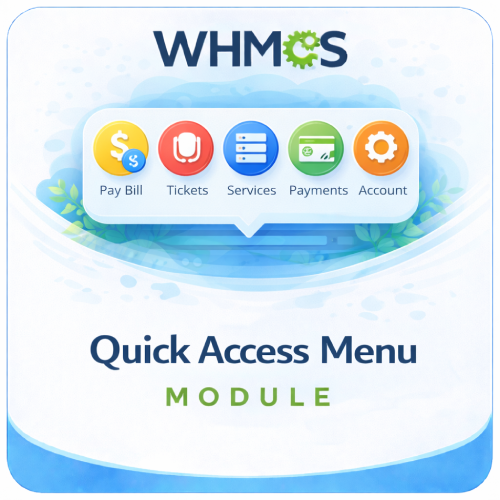
The Quick Access Menu For WHMCS gives logged-in clients fast access to frequently used account, billing, service, and support pages.

Included:

  • 7-Day Free Trial Access
  • Multi-Level Technical Support
  • One-Time Payment, No Recurring Fees
  • Lifetime Owned License
  • Instant Download After Purchase
  • Latest WHMCS Compatible
Category: WHMCS Addons Tags: account settings shortcut, client area shortcuts, client dashboard, faster navigation, pay bill shortcut, popup menu, support ticket shortcut, WHMCS addon, WHMCS quick access menu, WHMCS UX
  • Description
  • FAQs

Description

Product Description

The Quick Access Menu For WHMCS adds a visual shortcut window to the logged-in client area, helping customers reach commonly used account pages without searching through several navigation menus.

When a client visits the WHMCS account dashboard, the quick-access window opens automatically and presents nine clearly labeled icon shortcuts for services, unpaid invoices, account details, payment methods, support, new orders, password changes, and logout.

Clients can close the window when it is not needed and open it again from the Quick Links button added to the client-area navigation, making important destinations readily available throughout their session.

How It Works

  1. Client Signs In: The quick-access feature is displayed only to authenticated WHMCS clients.
  2. Dashboard Menu Opens: The shortcut window appears automatically on the client account homepage.
  3. Client Selects an Action: Each icon links directly to a commonly used WHMCS destination.
  4. Window Can Be Closed: A visible close control lets the client dismiss the menu.
  5. Quick Links Remain Available: The client can reopen the menu from the navigation button on other logged-in pages.

Included Quick Links

  • My Services: Open the client’s active and historical WHMCS services list.
  • Pay My Bill: Go directly to invoices currently marked as unpaid.
  • Update Info: Open the client account details page.
  • Update Payment: Manage saved payment methods from the client area.
  • Submit Ticket: Start a new support-ticket request.
  • View Tickets: Review existing support-ticket conversations.
  • Add New Plan: Open the WHMCS store to browse additional products and services.
  • Change Password: Access the account password update page.
  • Logout: Sign out of the WHMCS client account.

Key Features

  • Popup Shortcut Window: Present essential client-area actions together in one visual menu.
  • Automatic Dashboard Display: Open the quick links when an authenticated client visits the account homepage.
  • Persistent Navigation Button: Add a Quick Links control that reopens the window on logged-in client pages.
  • Nine Direct Shortcuts: Cover common service, billing, account, payment, support, ordering, security, and session actions.
  • Icon-Based Navigation: Pair each destination with a recognizable image and text label.
  • Full-Screen Window: Keep the available actions prominent and easy to identify.
  • Responsive Sizing: Adjust shortcut icon and item dimensions for smaller mobile screens.
  • Logged-In Access: Keep the quick menu hidden from unauthenticated visitors.
  • Direct WHMCS Destinations: Use standard WHMCS client-area routes for each action.

Faster Client Navigation

Customers often return to the client area for a small set of recurring tasks. The Quick Access Menu places these actions together so they can move directly to the page they need.

  • Reach unpaid invoices without browsing the billing menu.
  • Open services and available plans from the same shortcut window.
  • Submit a new ticket or review existing tickets quickly.
  • Manage profile details, payment methods, and passwords more easily.
  • Return to the menu whenever another action is required.

Client Area Experience

  • Clear Action Labels: Explain each shortcut with straightforward customer-facing text.
  • Visual Icons: Help clients recognize actions at a glance.
  • Simple Close Control: Let clients dismiss the window and continue using the current page.
  • Convenient Reopening: Keep the Quick Links button available in the logged-in navigation area.
  • Dashboard Visibility: Introduce important account actions immediately after login.

Installation and Theme Requirements

  • Install the supplied PHP hook in the WHMCS includes/hooks directory.
  • Upload the included popup stylesheet and shortcut image assets to their required locations.
  • Apply the supplied header template integration to the WHMCS six client-area theme.
  • Back up an existing customized header template before replacing or merging it.
  • Custom themes may require manual placement of the Quick Links button container and style adjustments.

Business Benefits

  • Reduce Navigation Steps: Give clients direct routes to frequently requested pages.
  • Improve Feature Discovery: Make services, billing, support, and account tools more visible.
  • Encourage Self-Service: Help customers locate common actions without contacting support for directions.
  • Highlight Unpaid Invoices: Provide a dedicated shortcut to the client’s unpaid invoice list.
  • Promote Additional Orders: Include a direct route to the WHMCS product store.
  • Create a Friendlier Dashboard: Present important account actions through a clear visual interface.

Ideal For

  • Web hosting and reseller hosting companies
  • SaaS and subscription service providers
  • Digital agencies using the WHMCS client area
  • Businesses seeking more visible self-service options
  • WHMCS installations based on the compatible six theme structure

Why Choose Quick Access Menu For WHMCS?

Quick Access Menu brings nine commonly used client actions into one convenient window. Customers can manage services, billing, account details, payment methods, support requests, new orders, and account security with fewer navigation steps.

By opening automatically on the client dashboard and remaining accessible through a dedicated navigation button, the menu provides a simple way to make everyday WHMCS tasks easier to find.
What does Quick Access Menu for WHMCS do?

It adds a convenient popup menu to the WHMCS client area, giving customers faster access to frequently used account sections.

Is this module compatible with the latest WHMCS version?

Yes, the module is compatible with the latest supported WHMCS version.

Is this module compatible with current PHP versions?

Yes, it supports the PHP versions compatible with the latest WHMCS release.

Where is the quick-access menu displayed?

It appears within the WHMCS client area when customers access their account dashboard.

Which shortcuts are included?

The menu includes supported shortcuts for paying bills, support tickets, services, payment methods, and account settings.

Can customers access unpaid invoices through the menu?

Yes, the Pay Bill shortcut helps customers reach the relevant billing area quickly.

Can customers access support tickets?

Yes, the menu provides a shortcut to the WHMCS support-ticket section.

Can customers access their active services?

Yes, the Services shortcut directs customers to their WHMCS products and services.

Can customers manage their payment methods?

Yes, the menu can link customers to the WHMCS payment-method management page.

Can customers access their account settings?

Yes, an Account Settings shortcut gives customers faster access to their profile and account options.

Does the menu replace standard WHMCS navigation?

No, it provides an additional shortcut menu while the normal WHMCS navigation remains available.

Does the module reduce the number of clicks?

Yes, it lets customers open commonly used sections without navigating through multiple menus.

Does the menu appear automatically?

Yes, the popup menu appears according to the module’s client-area display behavior.

Can customers open and close the menu?

Yes, the popup interface can be opened or dismissed as needed.

Is the menu visible on every client-area page?

Display behavior depends on how the installed module injects the menu into the client-area template.

Can I choose which pages display the menu?

Page-level display controls should only be advertised if they are available in your installed module version.

Can administrators customize the shortcuts?

The confirmed module includes essential shortcuts. Custom shortcut management should only be claimed if supported by your installed version.

Can I add my own custom links?

Custom-link support depends on the configuration options included in the installed module version.

Can I remove shortcuts that I do not need?

Shortcut visibility controls should only be advertised if available in your installed version.

Can shortcut labels be changed?

Label customization depends on the settings or language overrides supported by the installed module.

Can the shortcut icons be changed?

Icon customization should only be advertised if provided by the installed version.

Can the menu link to an external page?

External custom links require configurable shortcut support in the installed module version.

Can the menu show a link to a custom addon page?

This is possible only if the installed version supports custom links or is customized for that page.

Is the menu mobile-friendly?

Yes, it is designed to work across desktop and mobile client areas.

Does it work on tablets?

Yes, the responsive interface is suitable for supported tablet screen sizes.

Does the popup block important page content?

It is designed as a convenient floating or popup interface, but its placement should be checked with heavily customized themes.

Does the menu affect client-area performance?

No significant performance impact is expected because the feature is lightweight.

Does the module make external API requests?

No external service is required for the confirmed quick-navigation functionality.

Does it require a separate mobile application?

No, customers use the menu directly within the WHMCS client area.

Does it require JavaScript?

The popup interaction may rely on browser-side JavaScript, as do many standard WHMCS interface components.

What happens if a customer disables JavaScript?

The popup behavior may not work correctly, but standard WHMCS navigation should remain available.

Does the menu respect WHMCS login permissions?

Yes, it links customers to sections available through their authenticated WHMCS account.

Can customers access another client’s information through the menu?

No, WHMCS authentication and authorization continue to control access to account data.

Does the module change customer permissions?

No, it only provides quicker links to existing WHMCS client-area sections.

Can it display invoice or ticket counts?

Counters or status badges should only be advertised if supported by the installed module version.

Can it show different shortcuts to different client groups?

Client-group targeting should only be claimed if it is included in your installed module version.

Can it show shortcuts based on owned products?

Product-based shortcut rules should only be advertised if the installed version supports them.

Does the module support multilingual WHMCS websites?

Standard labels may follow WHMCS language handling, while custom language support depends on the module’s language files.

Can the menu match my website branding?

Its clean design is intended to blend with WHMCS, while advanced styling may require theme-level CSS adjustments.

Does it work with the standard WHMCS themes?

Yes, it is designed to work with standard WHMCS client-area templates.

Does it work with custom WHMCS themes?

It should work with themes that preserve standard WHMCS structures, but heavily customized templates may require styling adjustments.

Does it work with the Lagom theme?

Compatibility should be tested with your specific Lagom version and customizations.

Are template modifications required?

No, the module is designed to work without manual template edits.

Does it modify WHMCS core files?

No, it operates as a WHMCS addon without modifying WHMCS core files.

Is coding required to use the module?

No, standard installation and use do not require coding.

Can it reduce support requests?

Yes, easier access to billing, services, and tickets can reduce navigation-related support questions.

Can it improve invoice payments?

Yes, the direct Pay Bill shortcut makes it easier for customers to reach unpaid invoices.

Can it improve customer engagement?

Yes, faster navigation encourages clients to use more account-management features.

Is this module useful for customers with many services?

Yes, quick access helps customers reach service and billing pages without searching through multiple menus.

Can it be used by hosting and SaaS businesses?

Yes, it is suitable for any business using WHMCS as its customer portal.

Who should use this module?

It is ideal for hosting providers, SaaS platforms, resellers, agencies, and other WHMCS businesses seeking a faster and more user-friendly client area.

Related products

  • Email Verification for WHMCS

    Email Verification for WHMCS

    The Email Verification For WHMCS requires new customers to confirm their email with a time-limited code before registering or completing checkout. Included: 7-Day Free Trial Access Multi-Level Technical Support One-Time Payment, No Recurring Fees Lifetime Owned License Instant Download After Purchase Latest WHMCS Compatible
    $49.00 USD
    View DetailsBuy Now
  • Sale Pricing Manager

    Sale Pricing Manager

    The WHMCS Sale Pricing Manager schedules product discounts by currency and billing cycle, then automatically applies the correct sale price throughout the WHMCS ordering process. Included: 7-Day Free Trial Access Multi-Level Technical Support One-Time Payment, No Recurring Fees Lifetime Owned License Instant Download After Purchase Latest WHMCS Compatible
    $49.00 USD
    View DetailsBuy Now
  • Add Tip On Invoice Module

    Add Tip On Invoice Module

    The Add Tip On Invoice Module For WHMCS lets clients add, adjust, or remove an optional custom tip from an unpaid invoice before payment. Included: 7-Day Free Trial Access Multi-Level Technical Support One-Time Payment, No Recurring Fees Lifetime Owned License Instant Download After Purchase Latest WHMCS Compatible
    $49.00 USD
    View DetailsBuy Now
  • Agree Terms Module for WHMCS

    Agree Terms Module for WHMCS

    The Agree Terms Module For WHMCS requires customers to review and accept product-specific terms before continuing with their order. Included: 7-Day Free Trial Access Multi-Level Technical Support One-Time Payment, No Recurring Fees Lifetime Owned License Instant Download After Purchase Latest WHMCS Compatible
    $99.00 USD
    View DetailsBuy Now
logo

Premium WHMCS modules, OTT/IPTV solutions, payment gateways, and themes for hosting and streaming businesses.

Contact us on Telegram

Quick Links

Home Services Contact Us Blog

Our Services

WHMCS Addons WHMCS OTT Modules WHMCS Payment Gateways WHMCS Client Area Themes WordPress OTT Themes Custom Development

Legal

Terms of Service Refund Policy Privacy Policy

© 2026 WHMCS MODULES. All Rights Reserved.